Case Study: ProvSQL as a Probability Calculator
This case study uses ProvSQL as an exact, correlation-aware probability calculator that you drive in SQL. Classic probability problems – base rates, correlated events, conditional expectation, truncated distributions, denial constraints – become ordinary queries, and the answers are computed exactly (not by sampling, unless you ask) and correlation-aware (the provenance circuit tracks shared events, so joint and conditional probabilities come out right without independence assumptions or hand-rolled inclusion–exclusion).
A recurring thread is the conditioning operator |: once a model is
loaded, A | B reads as “A given B”, for discrete events, for
continuous random variables, and for probabilistic aggregates alike.
Tip
Best run as a notebook. This case study is meant to be run interactively in ProvSQL Studio in notebook mode – try it in the ProvSQL Playground, no install, as a runnable notebook and step through the cells. See the Playground note.
The Scenario
An epidemiology desk at a public-health agency keeps a small probabilistic model of a screening programme and reaches for ProvSQL whenever a question needs probabilistic evaluation. A series of such questions follows; each is a recognisable textbook problem, and we work through each one step by step, building its model and then asking the calculator.
This case study assumes a working ProvSQL installation (see Getting ProvSQL). It needs no setup script: each problem creates its own little model as part of the story. Start a fresh database and enable the extension once,
createdb cs8
psql -d cs8
CREATE EXTENSION IF NOT EXISTS provsql CASCADE;
SET search_path TO public, provsql;
then paste the blocks below as you read.
Problem 1: The Base-Rate Fallacy
Screening tests are imperfect, but a good one is quite accurate. Ours catches 90% of true cases (its sensitivity) and correctly clears 95% of healthy people (its specificity); the disease itself is rare, affecting 1% of the population.
A patient tests positive. What is the probability they actually have the
disease? The tempting answer – “around 90%, since the test is that
accurate” – is wrong, and the mistake is common enough to have a name: the
base-rate fallacy. It
forgets how rare the disease is. Among the 99% who are healthy, even a 5%
false-positive rate produces a flood of positives, and that flood swamps
the genuine cases – so most positive results are in fact false alarms. The
quantity we really want,  ,
comes out far below 90%. Let us compute it exactly.
,
comes out far below 90%. Let us compute it exactly.
The model is the joint sample space: the four possible worlds for one screened patient – diseased or healthy, each crossed with a positive or negative test. We build it in small steps. First, keep the test’s three numbers in one place, named once and easy to change:
DROP TABLE IF EXISTS params CASCADE;
CREATE TABLE params(prevalence float, sensitivity float, specificity float);
INSERT INTO params VALUES (0.01, 0.90, 0.95);
Now spell out the four worlds. Each world’s probability is the prevalence of its health state times the test’s rate in that state – the chain rule, written once per world:
DROP TABLE IF EXISTS screening CASCADE;
CREATE TABLE screening(disease boolean, positive boolean, p float);
INSERT INTO screening
SELECT true,  true,  prevalence       * sensitivity        FROM params  -- true positive
UNION ALL
SELECT true,  false, prevalence       * (1 - sensitivity)  FROM params  -- false negative
UNION ALL
SELECT false, true,  (1 - prevalence) * (1 - specificity)  FROM params  -- false positive
UNION ALL
SELECT false, false, (1 - prevalence) * specificity        FROM params; -- true negative
Have a look: each row carries the probability of its world, and the four sum to 1.
SELECT * FROM screening;
These four worlds are mutually exclusive: for any one patient exactly one
of them is the true state of affairs. repair_key is how ProvSQL
records that – it turns a set of rows into a block of mutually-exclusive
alternatives (a “repair” of a key), exactly one of which holds at a time.
Passing an empty key makes the whole table one such block, and
set_prob then gives each world the probability in its p
column:
SELECT repair_key('screening', '');
SELECT disease, positive, set_prob(provenance(), p) FROM screening;
The model is loaded. Now let us see what a probabilistic event looks like
to ProvSQL. Every row a query returns over a provenance-tracked table
carries a provenance token in a hidden provsql column: a handle to
the little circuit explaining how that row came to be. Ask for the distinct
values of positive:
SELECT DISTINCT positive FROM screening;
Two rows come back, true and false, each with a token. Click the
token on the true row. You stay in Notebook mode; Studio just adds
a cell below showing that token’s circuit – a single plus gate joining
the two mutually-exclusive worlds in which the test reads positive (the
diseased true positive and the healthy false positive). That little circuit
is the event “the test is positive”.
On that circuit cell, press Evaluate to add an evaluation cell bound to the circuit above. Leave the scheme on Probability and press Run: ProvSQL walks the circuit and returns about 0.0585 – a positive result is uncommon.
That click-path is one SQL query. probability_evaluate takes a
token and returns its probability, and provenance hands back the
token of a query’s rows – so the same number comes from one cell:
SELECT probability_evaluate(provenance())
FROM (SELECT DISTINCT positive FROM screening) AS s
WHERE positive;
The question we actually care about is conditional: given a positive
test, how likely is the disease? ProvSQL writes “A given B” as
A | B. We name both events – diseased and positive – and ask for the
two conditionals (GROUP BY () collapses each event’s worlds into a
single token, just as DISTINCT did above):
WITH e AS (
  SELECT (SELECT provenance() FROM screening WHERE disease  GROUP BY ()) AS d,
         (SELECT provenance() FROM screening WHERE positive GROUP BY ()) AS pos)
SELECT probability_evaluate(pos | d) AS pos_given_disease,
       probability_evaluate(d | pos) AS disease_given_pos
FROM e;
The first number is about 0.9:  recovers the test’s sensitivity, as it must. The second is
the punchline – is only
about 0.15, not 0.9. Most positive results really are false alarms,
exactly as the base-rate fallacy warned. ProvSQL computed
recovers the test’s sensitivity, as it must. The second is
the punchline – is only
about 0.15, not 0.9. Most positive results really are false alarms,
exactly as the base-rate fallacy warned. ProvSQL computed  – Bayes’ rule – over the shared circuit, with no
arithmetic on your part.
– Bayes’ rule – over the shared circuit, with no
arithmetic on your part.
Problem 2: Correlation That Matters
Risk factors rarely act alone. Obesity, for instance, raises the risk of both type 2 diabetes and hypertension. Because the two conditions share that common cause, they are correlated: a patient who has one is more likely to have the other. Suppose we want the probability that a patient develops at least one of the two. Treating them as independent overestimates it – let us see by how much.
Note
This model – the factors, the probabilities, and the “obesity plus one extra trigger” rule for each condition – is invented and deliberately oversimplified to illustrate correlation. It is not medical guidance.
Model three independent base factors: obesity (the shared cause) and one
extra trigger for each condition, each present with its own probability.
add_provenance makes the table provenance-tracked (one
independent token per row) and set_prob reads each row’s
probability from its p column:
DROP TABLE IF EXISTS risk CASCADE;
CREATE TABLE risk(factor text, p float);
INSERT INTO risk VALUES
  ('obesity',            0.5),   -- the shared common cause
  ('insulin_resistance', 0.6),   -- extra trigger for diabetes
  ('high_salt',          0.7);   -- extra trigger for hypertension
SELECT add_provenance('risk');
SELECT factor, set_prob(provenance(), p) FROM risk;
A patient develops diabetes when they are both obese and
insulin-resistant. In SQL “both” is a join – ask for the two facts at once
– and ProvSQL records the result’s provenance as the product of their
tokens (a provenance_times, formed for you). Its probability:
SELECT probability_evaluate(provenance())
FROM risk o, risk x
WHERE o.factor = 'obesity' AND x.factor = 'insulin_resistance';
0.3 (that is  ). Hypertension is the same query with
high_salt in place of insulin_resistance – 0.35. Now “diabetes
or hypertension”: match a patient who is obese and has either trigger,
and fold the two matches into one event with GROUP BY (). The provenance
of a set of alternatives is their sum (a provenance_plus), so
this single query is the “at least one condition” event. We do not even
need to select anything in particular – the provsql token rides along in
every result row, so a constant label is enough to read:
SELECT 'diabetes or hypertension' AS event
FROM risk o, risk x
WHERE o.factor = 'obesity'
  AND x.factor IN ('insulin_resistance', 'high_salt')
GROUP BY ();
Click the token to see its circuit. obesity appears as a single
gate feeding both branches, not two separate copies: ProvSQL addresses
every gate by its content, so the shared cause is literally the same node
everywhere – and that overlap is exactly what an independence assumption
ignores. Press Evaluate and Run: about
0.44.
Compare that with the independence estimate, plain arithmetic
 :
:
SELECT 1 - (1 - 0.3) * (1 - 0.35) AS independence_estimate;
0.545 – a 24% overstatement. ProvSQL’s 0.44 is correct because the
disjunction circuit accounted for the shared obesity on its own. You never
had to write the inclusion–exclusion correction  .
.
The same shared gate also lets us turn the question around and condition on
it. Problem 1 conditioned one event on another with the binary A | B;
the unary | B (the prefix form of given) conditions a
whole query’s rows at once – a directive in the SELECT list that is
stripped from the output, leaving each row’s provenance conditioned on B.
Condition every factor on obesity being present:
SELECT factor,
       round(probability_evaluate(provenance())::numeric, 4) AS p_given_obesity
FROM (
  SELECT factor, | (SELECT provenance() FROM risk WHERE factor = 'obesity')
  FROM risk
) s
ORDER BY factor;
obesity comes back at 1.0 – an event given itself is certain – while
insulin_resistance (0.6) and high_salt (0.7) are unchanged from
their priors: they share no gate with obesity, so conditioning on it tells us
nothing about them. The same content-addressed circuit that made the
disjunction correct makes the conditional correct.
See what conditioning built. Select one conditioned tuple on its own and
click its provsql token:
SELECT factor, | (SELECT provenance() FROM risk WHERE factor = 'obesity')
FROM risk WHERE factor = 'insulin_resistance';
You stay in Notebook mode; Studio adds a circuit cell below showing a ∣
(conditioned) gate with three labelled children – the target event
(insulin_resistance), the evidence (obesity), and their joint
target ⊗ evidence. Its probability is read straight off that gate as
 –
Bayes’ rule over the shared circuit, the same ratio Problem 1 used. The
–
Bayes’ rule over the shared circuit, the same ratio Problem 1 used. The |
operator, in both its binary and unary forms (with the function spellings
cond and given), is documented in
the conditioning chapter.
Problem 3: The Right Method, Chosen for You
A probability can be computed from a circuit in many ways – some exact
(factoring out independent parts, inclusion–exclusion,
knowledge compilation,
tree decomposition),
some by random sampling. You rarely choose: the evaluation strip (and
probability_evaluate under it) picks the cheapest method that
fits the circuit – and “fits” matters, because not every method works on
every circuit.
Re-run the “at least one condition” query from Problem 2 and click its token to bring the circuit back up:
SELECT 'diabetes or hypertension' AS event
FROM risk o, risk x
WHERE o.factor = 'obesity'
  AND x.factor IN ('insulin_resistance', 'high_salt')
GROUP BY ();
Press Evaluate, leave the method on its default, and Run: 0.44, and the strip notes via possible-worlds – the exact method the chooser judged cheapest here. Now change the method dropdown in the strip and re-run:
Monte-Carlo works on any circuit, but only approximately: it samples at random, so its estimate lands near 0.44, not exactly on it. Give it an accuracy target in the strip’s arguments box –
eps=0.1, delta=0.05– and it reports the guarantee it met: the interval the true probability lies within, at the requested confidence (95% here).independentrefuses –Not an independent circuit– because it assumes no input is shared between the parts it multiplies, and hereobesityfeeds both conditions (the shared gate in that circuit).
That refusal is the point. The chooser never offered independent for
this circuit; the bare default stays correct as your circuits gain
structure, and a method that does not fit is refused, never quietly wrong.
Problem 4: A Continuous Quantity
Every event so far was discrete – true or false. But a lab biomarker is a continuous number, and
ProvSQL represents one as a random_variable: a
value that is not a single number but a whole distribution. Conditioning on
it works exactly as | did for discrete events, and the result is again
a distribution, whose mean, variance, and range you can read off with
expected, variance, and support.
We want exact, closed-form answers, not sampled ones. In the Config
panel, set provsql.rv_mc_samples to 0: that turns off the Monte-Carlo
fallback, so ProvSQL either answers a continuous query in closed form or
tells you it cannot, instead of silently sampling. The panel applies the
setting to every cell you run (outside Studio, the equivalent is
SET provsql.rv_mc_samples = 0).
Build a biomarker that follows a Normal distribution with mean 20 and standard deviation 5, and look at it:
SELECT normal(20, 5) AS biomarker;
One row comes back with a random_variable token. Click it, then on
the circuit cell press Circuit mode (this leaves
the notebook; you will come back through the Notebook
tab in the mode switcher at the top). In Circuit mode, press
Run on the evaluation strip: for a continuous variable the default
evaluation is its distribution profile, and Studio draws the bell curve
of Normal(20, 5), centred on 20. Have a look, then return through the
Notebook tab – the notebook reopens where you left it.
Its mean is no surprise:
SELECT expected(normal(20, 5));
Now suppose a patient is referred – their biomarker came back above a
threshold of 25. Conditioning the variable on that event, x | (x > 25),
chops off everything below 25 and renormalises; the result is itself a
random_variable. Its mean is no longer 20:
WITH r AS (SELECT normal(20, 5) AS x)
SELECT expected(x | (x > 25)) FROM r;
About 27.6 – a referred patient’s biomarker is expected well above the threshold, not at the population average. The conditioned variable has a spread and a range too:
WITH r AS (SELECT normal(20, 5) AS x)
SELECT variance(x | (x > 25))     AS variance,
       (support(x | (x > 25))).lo AS lowest_value
FROM r;
The variance has shrunk to about 5 (from 25 for the unconditioned Normal), and the lowest value the conditioned biomarker can take is exactly 25 – truncation moved the floor up to the threshold.
We took those moments one at a time, but the conditioned biomarker is a
single object – a random_variable you can hand onward, store, or
inspect whole. Print it:
WITH r AS (SELECT normal(20, 5) AS x)
SELECT (x | (x > 25)) AS referred_biomarker
FROM r;
Click its token, open Circuit mode, and press Run. Its distribution profile is the truncated bell curve – everything below 25 cut away, the rest renormalised – with its support, mean, and variance reported alongside: the same conditioned variable you just took moments of, now seen as a whole distribution.
The same | also conditions one event on another, so a conditional
probability reads directly. Among referred patients (biomarker above 25),
how many are in fact severe (above 30)? That is
 , written by conditioning the two comparison
events:
, written by conditioning the two comparison
events:
WITH r AS (SELECT normal(20, 5) AS x)
SELECT probability((x > 30) | (x > 25)) FROM r;
About 0.14: roughly one referral in seven crosses the severe line. Both
comparisons read the same x, so ProvSQL keeps the dependence and
returns the correlation-aware  (since
 {x > 30} ⊂ {x > 25}), not the
product of the two marginals. It is a comparison against a constant on one
distribution, so the answer is closed-form – exact even with
provsql.rv_mc_samples = 0.
Problem 5: A Probabilistic Total
The last carrier is an aggregate. When the rows you add up are themselves
uncertain, their total is a random quantity, and ProvSQL tracks it as an
agg_token – the aggregate counterpart of a provenance token.
Each row of cases reports a day’s case count for a region, present only
with some probability:
DROP TABLE IF EXISTS cases CASCADE;
CREATE TABLE cases(day int, region text, n int, p float);
INSERT INTO cases VALUES (1, 'North', 3, 0.5), (1, 'North', 4, 0.5), (1, 'South', 2, 0.8);
SELECT add_provenance('cases');
SELECT day, region, n, p, set_prob(provenance(), p) FROM cases;
Sum each region’s counts with an ordinary GROUP BY. Because the inputs
are uncertain, each total comes out as an agg_token rather than a plain
number – look at the per-region totals:
DROP TABLE IF EXISTS casesum CASCADE;
CREATE TABLE casesum AS SELECT region, sum(n) AS total FROM cases GROUP BY region;
SELECT * FROM casesum;
The North has two possible contributions, 3 and 4, each present with probability 0.5. Its expected total – the average over all the ways the days could turn out – is:
SELECT expected(total) FROM casesum WHERE region = 'North';
3.5 (that is  ). Now condition on an
observation: suppose we know the high-count day (
). Now condition on an
observation: suppose we know the high-count day (n = 4) really
happened. The expected total given that:
SELECT expected(total | (SELECT provenance() FROM cases WHERE n = 4))
FROM casesum WHERE region = 'North';
5.5 – a certain 4 plus the still-uncertain 3 (worth  on average). The
 | operator conditioned the aggregate exactly as it
conditioned the discrete events in Problem 1 and the continuous variable in
Problem 4.
Like the conditioned biomarker, the conditioned total is a value in its own
right – here an agg_token. Select it directly to get its token:
SELECT total | (SELECT provenance() FROM cases WHERE n = 4) AS conditioned_total
FROM casesum WHERE region = 'North';
Click that token to see its circuit – the same ∣ gate as before,
now over the aggregate and the evidence. In
Circuit mode, the evaluation strip defaults to the distribution profile;
switch it to the moment evaluator (order k = 1, raw) and press
Run: its expected value comes back as 5.5, the same answer
as above. A moment of an aggregate is computed exactly – by enumerating the
rows’ contributions and weighting each by its probability – so it needs no
sampling and is unaffected by the provsql.rv_mc_samples = 0 you set in
Problem 4 (its full distribution and individual samples, by contrast, are
estimated by Monte Carlo, and would need sampling switched back on).
Problem 6: Ruling Worlds Out
repair_key in Problem 1 imposed one kind of constraint – at most
one row of a key group is real. Many real rules are not keys but relations
between pairs of rows: “no two reported doses of one vaccine fall within 21
days”, “no two outbreak cases at one site are reported within the incubation
window”. No key declaration captures these. They are denial constraints –
a query describing a forbidden pattern – and ProvSQL conditions on their
non-occurrence with the event-negation operator !
(provenance_not).
An immunization registry merges dose reports from several sources, so each reported dose is only probably a real administration. A data-quality rule says two doses of the same vaccine must be at least 21 days apart. Here are four uncertain dose reports for one patient – the date each was administered and the probability it is genuine. The Mar 14 report sits close to two others: it is within 21 days of both Mar 4 (10 days earlier) and Mar 28 (14 days later).
DROP TABLE IF EXISTS doses CASCADE;
CREATE TABLE doses(id int, administered date, p float);
INSERT INTO doses VALUES
  (1, '2024-03-04', 0.5),
  (2, '2024-03-14', 0.5),
  (3, '2024-03-28', 0.5),
  (4, '2024-04-30', 0.8);
SELECT add_provenance('doses');
SELECT id, administered, p, set_prob(provenance(), p) FROM doses;
The forbidden pattern – “some two doses are fewer than 21 days apart” – is an
ordinary self-join. Materialise it, collapsing all the witnessing pairs into a
single DISTINCT row: that one row’s provenance is the violation event
W, “the record has a too-close pair”. Two pairs qualify – (Mar 4, Mar 14)
and (Mar 14, Mar 28) – and they share the Mar 14 dose, so W is not a
simple product of independent pairs; ProvSQL tracks the shared gate and gets
the overlap right (the same correlation-awareness as Problem 2). So
provenance() over the violation table is W, and !provenance() is
the complementary “valid record” event:
DROP TABLE IF EXISTS violation;
CREATE TEMP TABLE violation AS
  SELECT DISTINCT 1
  FROM doses a JOIN doses b
    ON a.id < b.id AND abs(a.administered - b.administered) < 21;

SELECT probability_evaluate(provenance())  AS p_violation,
       probability_evaluate(!provenance()) AS p_valid
FROM violation;
The clash has probability 0.375, so a valid record (!provenance()) has
probability 0.625.
Now condition each dose on the record being valid – one row per dose. Prior and
posterior are the same row token, provenance(), evaluated two ways:
unconditioned, and conditioned on !W. Each row’s own provenance stays the
dose itself; the violation event is pulled in by an inert
(SELECT provenance() FROM violation) – naming W once, without coupling
it into the row’s lineage:
SELECT d.id,
       probability_evaluate(provenance()) AS prior,
       probability_evaluate(provenance() | !(SELECT provenance() FROM violation)) AS posterior
FROM doses d
ORDER BY d.id;
Same prior, different posterior. A valid record is evidence against exactly the
doses the constraint could have caught, in proportion to how implicated each is:
the Mar 14 dose (dose 2), which would clash with either neighbour, drops the
furthest – from 0.5 to 0.2 – while doses 1 and 3, each in only one of the
two possible violations, drop to 0.4; dose 4, far from the rest and in no
possible clash, is untouched at 0.8. The constraint here was an arbitrary
query: ! turns any forbidden pattern into evidence, the way
repair_key turns a key into mutual exclusion, but without being
limited to keys.
Problem 7: A Skewed Waiting Time
Problem 4’s biomarker was symmetric – a Normal. But durations – an
incubation period, a time to recovery – are not: they cannot go
negative and they carry a long right tail. The natural model is a
log-normal
distribution, and ProvSQL has it as a constructor. Keep
provsql.rv_mc_samples = 0 from Problem 4 – everything below is
closed-form.
Model the incubation period (in days) of our pathogen as
lognormal(1.6, 0.42) – the two parameters are the mean and standard
deviation of the underlying normal, not of the duration itself, so the
shape is easiest to read through its quantiles:
WITH m AS (SELECT lognormal(1.6, 0.42) AS incubation)
SELECT quantile(incubation, 0.5)  AS median_days,
       quantile(incubation, 0.95) AS p95_days,
       expected(incubation)       AS mean_days
FROM m;
The median is about 4.95 days, but the mean is higher, 5.41 – the hallmark of a right-skewed distribution, where the long tail pulls the average above the typical case. The 95th percentile sits at 9.88 days: a quarantine window of ten days clears 95% of cases. That is the question quantiles answer directly and moments cannot.
The log-normal earns its name through a transform: the exp of a
Normal is a log-normal, and ProvSQL folds the two forms into the same
distribution. Building the incubation the long way, as exp of the
underlying normal, gives an identical mean:
SELECT expected(exp(normal(1.6, 0.42))) AS mean_via_exp;
5.41 again – the simplifier recognised exp(normal(μ, σ)) as
lognormal(μ, σ) and evaluated the closed form, no sampling. The
transform functions (exp, ln, pow, sqrt) compose with
the whole surface.
Finally, two strains with different incubation profiles – which tends
to keep a contact infectious longer? A wild type at
lognormal(1.6, 0.42) against a slower variant at
lognormal(1.9, 0.42):
WITH s AS (SELECT lognormal(1.6, 0.42) AS wild,
                  lognormal(1.9, 0.42) AS variant)
SELECT probability(wild > variant) AS p_wild_longer FROM s;
About 0.31: the wild type outlasts the variant in under a third of pairings, since the variant’s larger location parameter shifts its whole distribution right. The comparison is between two log-normals, which have a registered closed form – exact, no Monte Carlo.
Problem 8: How Many, and How Often
Every continuous variable so far was a measurement. But an
epidemiology desk also counts things – cases per day, positives in a
batch – and counts are discrete. ProvSQL provides the standard discrete
families as constructors (they enumerate their probability mass into a
categorical under the hood, so moments, quantiles, and comparisons are
all exact). Keep rv_mc_samples = 0.
Daily case counts in a stable outbreak follow a Poisson law. At an average of 6 cases a day, how often does a day break 10 – the threshold that trips an alert?
WITH d AS (SELECT poisson(6) AS cases)
SELECT expected(cases)       AS mean_cases,
       probability(cases > 10) AS p_alert
FROM d;
The mean is 6 by construction, and an alert fires on about 4.3% of days – rare, but not negligible. Now a screening batch: of 20 contacts, each independently positive with probability 0.3, how likely are 10 or more positives? That is a Binomial:
WITH b AS (SELECT binomial(20, 0.3) AS positives)
SELECT probability(positives >= 10) AS p_ten_plus FROM b;
About 4.8%. Both probabilities are computed by enumerating the exact
mass, so > and >= on a count are precise, not sampled.
The count models above assumed a known rate. Often the rate is exactly
what is uncertain – an attack rate we have only estimated from a handful
of cases. A Beta
distribution is the natural model for an unknown probability, bounded to
[0, 1]. Suppose 2 of 8 exposed contacts fell ill; a
beta(3, 7) posterior (a uniform prior, beta(1, 1), updated by 2
successes and 6 failures) summarises the attack rate:
SELECT expected(beta(3, 7))       AS rate_estimate,
       quantile(beta(3, 7), 0.05) AS credible_lo,
       quantile(beta(3, 7), 0.95) AS credible_hi;
The point estimate is 0.3, with a 90% credible interval from about 0.10 to 0.55 – wide, honestly reflecting only eight observations. The mean is closed-form; the Beta quantiles are found by bisecting its (incomplete-beta) CDF, again exactly and without sampling.
Problem 9: How Much Did the Data Teach Us?
Problem 8 turned eight observations into a beta(3, 7) posterior.
A natural follow-up question is how much information those
observations carried. Information theory has standard answers, and
ProvSQL exposes them as readouts (all in nats, still with
rv_mc_samples = 0): entropy for the residual
uncertainty of a distribution, and the Kullback-Leibler divergence
kl for the distance the update moved us:
WITH m AS (SELECT beta(1, 1) AS prior, beta(3, 7) AS posterior)
SELECT entropy(prior)      AS h_prior,
       entropy(posterior)  AS h_posterior,
       kl(posterior, prior) AS information_gain
FROM m;
The uniform prior has differential entropy 0 (it is
uniform(0, 1), whose entropy is ln 1); the posterior comes out
at about −0.598 – negative, as differential entropies of
concentrated densities are – so the update removed about 0.6 nats
of uncertainty. And kl(posterior, prior) returns exactly the same
0.598: against a uniform prior, the divergence is the entropy
drop ( ), a textbook identity the
calculator reproduces from the defining integral, evaluated by
quadrature on the two Beta densities.
), a textbook identity the
calculator reproduces from the defining integral, evaluated by
quadrature on the two Beta densities.
KL is honest about impossibility, too: collapse the posterior to its
point estimate and ask for the divergence from it –
kl(posterior, as_random(0.3)) – and the answer is Infinity.
A point mass assigns probability zero to everything but 0.3, so
no finite divergence from it exists (an absolute-continuity failure,
reported as such rather than approximated).
Problem 10: Two Subpopulations, One Measurement
Viral titres in the programme’s cohort are bimodal: about 70% of
cases are vaccinated break-throughs centred low, the rest an
unvaccinated group centred high. The standard fitted-density shape
for this is a Gaussian mixture, and the
gmm constructor loads one directly (here with weights,
means, and standard deviations straight from the fit):
WITH c AS (SELECT gmm(weights => ARRAY[0.7, 0.3],
                      means   => ARRAY[15.0, 40.0],
                      stddevs => ARRAY[4.0, 6.0]) AS titre)
SELECT titre,
       expected(titre) AS mean_titre,
       variance(titre) AS var_titre
FROM c;
The mixture decomposes into ProvSQL’s existing Bernoulli-mixture
gates, so the moments are exact (rv_mc_samples = 0): the mean
is  and the variance
 . The query also
returns
. The query also
returns titre itself: click its token and open Circuit mode to
see those gates – a Bernoulli selector choosing between the two Normal
components. A tail probability – how many cases exceed the reporting
threshold of 30 – is estimated by Monte Carlo over the same gates:
SET provsql.rv_mc_samples = 100000;
WITH c AS (SELECT gmm(ARRAY[0.7, 0.3], ARRAY[15.0, 40.0],
                      ARRAY[4.0, 6.0]) AS titre)
SELECT probability(titre > 30) AS p_report FROM c;
about 0.286: essentially the unvaccinated component’s mass above
30 ( ), with a vanishing
contribution from the low mode.
), with a vanishing
contribution from the low mode.
Problem 11: Borrowed Posteriors and Forecast Tables
Not every distribution on the desk was born in SQL. A modelling
team hands over an MCMC posterior for the reproduction number R
as a bundle of draws; a simulation report tabulates days-to-recovery
as a CDF. Both load directly, and everything below is exact again –
turn the sampler back off after Problem 10’s excursion:
SET provsql.rv_mc_samples = 0;
WITH p AS (SELECT empirical_samples(
             ARRAY[0.8, 0.9, 0.9, 1.0, 1.1, 1.1, 1.2, 1.4]) AS r)
SELECT expected(r)          AS r_mean,
       probability(r > 1)   AS p_epidemic_grows,
       quantile(r, 0.5)     AS r_median
FROM p;
empirical_samples loads the draws as the empirical
distribution (mass 1/8 per draw, duplicates merging), so the
answers are the sample statistics, exactly: mean 1.05,
P(R > 1) is the fraction of draws strictly above 1 – 0.5 –
decided analytically, and the median is the exact empirical quantile
1.0.
WITH f AS (SELECT empirical_cdf(
             grid => ARRAY[5.0, 10.0, 15.0, 25.0],
             cdf  => ARRAY[0.1, 0.5, 0.8, 1.0]) AS days)
SELECT expected(days)                   AS mean_days,
       (support(days)).lo               AS lo,
       (support(days)).hi               AS hi
FROM f;
empirical_cdf reads the table as a piecewise-linear CDF –
an atom of mass 0.1 at 5 days, then mass spread uniformly over each
grid interval – built from the same mixture gates as Problem 10’s
GMM. The mean is exact:
 days, on the support
 [5, 25].
Problem 12: A Parameter That Is Itself Uncertain
Every distribution so far had fixed parameters. But the assay’s
baseline drifts batch to batch: the true zero-point of this batch is
not 20 exactly, it is itself uncertain, say  . A single reading is then
 normal(mu, 2) –
a Normal whose mean is another random variable. ProvSQL’s
distribution constructors accept a random_variable where a
parameter is expected, so the model is written as one nested call:
SET provsql.monte_carlo_seed = 1;
SET provsql.rv_mc_samples    = 200000;
WITH m AS (SELECT normal(normal(20, 5), 2) AS reading)
SELECT reading,
       expected(reading) AS mean_reading,
       variance(reading) AS var_reading
FROM m;
The inner normal(20, 5) is a latent leaf shared by the outer
Normal, so the reading marginalises over it. Its mean is still
20, but the variance is the law of total variance at work –
the measurement noise plus the uncertainty in the baseline,
 – and the query returns about 20 and
29. A latent parameter breaks the closed-form moment recursion
(the outer moment is an integral over the inner distribution), so
this is the first problem that needs the sampler: the moments are
Monte-Carlo estimates over draws of
– and the query returns about 20 and
29. A latent parameter breaks the closed-form moment recursion
(the outer moment is an integral over the inner distribution), so
this is the first problem that needs the sampler: the moments are
Monte-Carlo estimates over draws of  , which is why the
sampler is switched back on here.
, which is why the
sampler is switched back on here.
The query also returns the reading itself. Click its token to
open the circuit: the outer normal gate draws its mean from the
shared inner normal(20, 5) latent leaf and its standard deviation
from the fixed 2, so the compound (hierarchical) structure is visible
at a glance – one random leaf feeding the mean wire, a constant feeding
the spread.
Problem 13: Learning That Parameter From Data
A latent parameter is a prior; the point of a prior is to update it.
Three control readings come back for this batch – 23, 24,
22 – each a noisy measurement normal(mu, 2) of the same
unknown baseline mu. Conditioning on an observed value uses the
same | operator, now with an equality event: | (normal(mu, 2) =
d) reads “given that this reading equalled d” and contributes that
observation’s likelihood (equivalently, observe).
and_agg folds the per-row events into one evidence token –
surfaced here as ev.e – which the moment readouts take as their
conditioning argument, giving the posterior of mu given the data:
WITH g AS (SELECT normal(20, 5) AS mu),
ev AS (SELECT and_agg(| (normal(g.mu, 2) = d)) AS e
FROM g CROSS JOIN (VALUES (23.0), (24.0), (22.0)) AS t(d))
SELECT expected(g.mu) AS prior_mean,
expected(g.mu, ev.e) AS posterior_mean,
variance(g.mu, ev.e) AS posterior_var,
evidence(ev.e) AS marginal_likelihood,
ev.e AS evidence_token
FROM g, ev;
Every reading shares the one mu leaf – the materialised CTE g
is a single node – so the three evidence factors condition the same
latent. Click the evidence_token UUID in ProvSQL Studio to open
its circuit: the evidence is a conjunction of the three observations,
each an = event reading the same mu leaf; that one shared node
is what couples the readings into a single posterior rather than three
independent updates. The prior mean is 20; the posterior mean pulls
toward the data at 22.8481, and the posterior variance collapses to
1.2658 – and these numbers are exact, not sampling estimates.
This model is the conjugate
Normal-Normal
shape, which ProvSQL recognises and computes in closed form:
deterministic, to full float precision, and independent of any sample
budget (it still answers under provsql.rv_mc_samples = 0).
Precision is the reciprocal of variance,
 , and precisions add. The prior variance
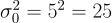 gives prior precision
 ; each reading has variance
  ,
precision
,
precision  , so the three together add
  . The
posterior precision is therefore
. The
posterior precision is therefore  , and inverting it back gives the posterior variance
 . The posterior mean is the precision-weighted
average
. The posterior mean is the precision-weighted
average  .
.
evidence returns the marginal likelihood
 , here 0.001172 – exactly the
multivariate-Normal prior predictive, computed as the product of the
sequential one-step predictives, and the quantity you would compare
across competing models. The same closed-form recognition covers the
other textbook pairs (a Gamma prior observed through Poisson counts or
Exponential gaps, a Beta prior through Binomial counts…); a model
outside the recognised table – say the latent reaching the reading
through arithmetic – answers through the general engine instead: each
, here 0.001172 – exactly the
multivariate-Normal prior predictive, computed as the product of the
sequential one-step predictives, and the quantity you would compare
across competing models. The same closed-form recognition covers the
other textbook pairs (a Gamma prior observed through Poisson counts or
Exponential gaps, a Beta prior through Binomial counts…); a model
outside the recognised table – say the latent reaching the reading
through arithmetic – answers through the general engine instead: each
| (normal(mu, 2) = d) reweights the prior draws of mu by the
observation’s density (importance sampling, no rejection), recovering
the same posterior to MC tolerance under the sample budget.
Recap
One operator, |, carried the first six problems with a single meaning
throughout – conditional probability,  – over three kinds of value: discrete events (Problems 1-3
and 6), a continuous
– over three kinds of value: discrete events (Problems 1-3
and 6), a continuous random_variable (Problem 4), and a probabilistic
aggregate agg_token (Problem 5). Problems 7 and 8 widened the
random-variable vocabulary (the log-normal and its transforms, the
discrete counts, the Beta rate, quantiles throughout), and Problems 9-11
layered onto the same surface the information-theoretic readouts
(entropy, kl) and the data-driven constructors
(gmm, empirical_samples /
empirical_cdf). Problems 12 and 13 closed the loop into full
Bayesian inference: a distribution parameter is itself a
random_variable (a latent prior), and conditioning on the data with
| – the per-row events folded by and_agg, their marginal
likelihood read by evidence – updates it into the posterior,
read straight back with the same expected /
variance readouts: in closed form (exact) for the recognised
conjugate shapes, by likelihood weighting otherwise. A few mechanics
recurred:
Each model was built in the database.
add_provenanceregisters a table for tuple-independent tracking andset_probattaches a probability to each row;repair_keyis the alternative registration, making the rows of a key group mutually exclusive outcomes, and the negation operator!conditions on the non-occurrence of an arbitrary forbidden pattern (Problem 6) – a denial constraint beyond keys. The model is ordinary SQL data: it persists, and is queried and updated, across sessions.Provenance is recorded per result row as a circuit of gates, and equal sub-expressions are the same gate. A base event shared between two queries is therefore one node, so joint, disjoint, and conditional probabilities come out consistent without assuming independence. That is the gap between ProvSQL’s 0.44 and the independence estimate 0.545 in Problem 2.
probability_evaluatereturns an exact probability and selects the evaluation method itself; Studio’s evaluation strip reports which one ran. Sampling appears only where no exact method applies (the full distribution profiles in Problems 4 and 5, the mixture tail in Problem 10) or where you request it (Problem 3’s Monte-Carlo run), and then under an explicit sample budget or error guarantee.
None of this required leaving SQL: the questions were ordinary queries, and the probabilistic answers were functions applied to their provenance.