Case Study: City Air-Quality Sensor Network
This case study demonstrates ProvSQL’s continuous-distribution
surface (see the chapter on continuous distributions) end-to-end through
ProvSQL Studio (see the Studio chapter). It is the
first case study
driven primarily by Studio rather than psql: random variables
benefit far more from interactive visualisation – PDFs, CDFs,
mixture DAG layouts, conditional histograms, simplifier
before-vs-after – than from text-mode output, and the workflow
below makes the rewriter, the simplifier, the analytic and
Monte-Carlo paths, and conditional inference all visible in the
canvas.
The Scenario
A municipal observatory operates a small air-quality sensor
network. Sensors of three different vendors report a
 concentration (fine particulate matter, i.e.
airborne particles with aerodynamic diameter at most 2.5 μm,
expressed in micrograms per cubic metre) on a fixed schedule. The sensors differ in calibration and noise
characteristics:
concentration (fine particulate matter, i.e.
airborne particles with aerodynamic diameter at most 2.5 μm,
expressed in micrograms per cubic metre) on a fixed schedule. The sensors differ in calibration and noise
characteristics:
high-end units report
normal(μ, σ)with small σ;low-cost units report
uniform[μ−δ, μ+δ]over a small window;a drift-prone unit reports
exponential(λ)while its internal hardware self-tests cycle;a multi-pass aggregating unit reports
erlang(k, λ)over the pass count.
A reference station with a calibrated lab-grade instrument contributes deterministic readings.
Regulatory categories partition the value axis: Good below 12,
Moderate between 12.1 and 35, Unhealthy above 35.1 (loosely
following the US EPA AQI breakpoints for PM2.5 in their pre-2024
form, simplified to three tiers). Each station has a Bernoulli
probability of being in calibration on a given day. A separate batch table of historical readings carries
the same shape so cross-batch queries via UNION ALL are
meaningful.
Your tasks:
inspect the per-row distributions and the rewriter’s effect on threshold queries;
compute the probability that each station’s reading exceeds an Unhealthy threshold, exercising the planner-hook rewrite for
WHERE reading > 35;model calibration uncertainty as a Bernoulli mixture and inspect the resulting
gate_mixtureshape;aggregate per-district readings and watch the simplifier fold the mixture cascade;
run conditional inference (
E[reading | reading > 35]) and see the closed-form truncated-distribution mean against the unconditional one;filter on the expected value of an aggregated random variable, combine today’s and yesterday’s batches with
UNION ALL, and compare probability methods ('independent'vs'monte-carlo'vs'tree-decomposition') side by side;find the worst reading per district with the order-statistic surface (
greatestand themaxaggregate);read percentiles and conditional medians off
quantile;clamp the exceedance over a threshold with
CASEand take its expectation;couple two sensors through a shared plume and measure it with
covariance/correlation;model drift, lifetime, and episodic spikes with the Gamma, Weibull, and Pareto families, including a mixed-family probability computed by quadrature;
compute fleet statistics under sensor dropout with the SQL-standard statistic aggregates (
stddev_pop,corr,percentile_cont);build a maintenance-triage headline with
CASEover aggregates and read its exact expectation;quantify the shared-plume coupling in nats with
mutual_information.
Setup
Tip
Prefer not to install? Use the Playground. Instead of the manual setup below, run this Studio-driven case study in full in the ProvSQL Playground: open it as a runnable notebook, or open the bare cs6 database and follow the Studio steps as you read; the continuous-distribution surface (analytic moments and Monte Carlo) needs no external tools. See the Playground note.
This case study assumes a working ProvSQL installation
(see Getting ProvSQL) and a running ProvSQL Studio
session pointed at it (see ProvSQL Studio). Download
setup.sql and load it
into a fresh PostgreSQL database:
createdb air_quality_demo
psql -d air_quality_demo -f setup.sql
The script creates the schema below and seeds the random-variable readings via the constructors documented in the chapter on continuous distributions. It is five tables:
stations(id, name, district)– four monitoring stations across two districts, provenance-tracked.readings(station_id, ts, pm25 random_variable)– onepm25reading per station per timestamp; therandom_variablecarries the per-station noise model (normal, uniform, exponential, erlang, or a deterministic lifted from the reference station).calibration_status(station_id, p)– Bernoulli probability that each station is in calibration on the day of interest.categories(name, lo, hi)– three regulatory categories (Good / Moderate / Unhealthy) keyed by their interval bounds.historical_readings(...)– same shape asreadings, populated from yesterday’s batch.
Connect Studio to the fixture:
provsql-studio --dsn postgresql:///air_quality_demo
and open http://127.0.0.1:8000/ in a browser.
The schema panel lists the fixture’s six relations: the
four provenance-tracked tables (stations,
calibration_status, readings, historical_readings)
carry the purple prov pill, categories is plain, and
station_mapping is tagged mapping. The pm25 column
on readings and historical_readings is flagged with a
terracotta rv pill: a heads-up that comparison and
arithmetic operators on this column are intercepted by the
planner hook and lifted into provenance gates, so a query like
pm25 > 35 produces a circuit rather than a Boolean.
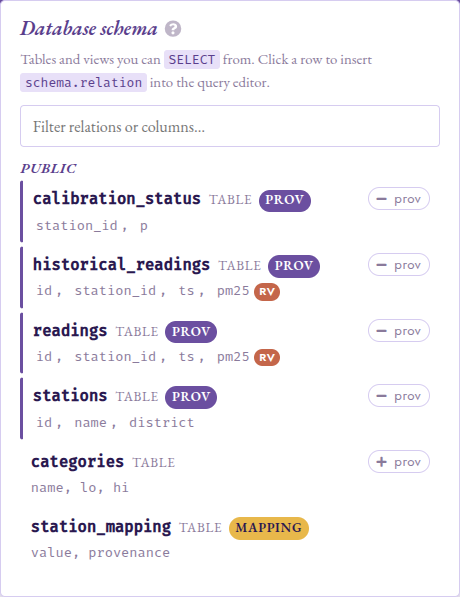
The schema panel opened from the top nav. The four
provenance-tracked tables carry the purple prov pill;
readings and historical_readings list pm25 with a
terracotta rv pill marking it as a random_variable
column.
Step 1: Inspect a Noisy Reading
In the Studio query box:
SELECT id, ts, pm25
FROM readings
WHERE station_id = 's1'
ORDER BY ts
The result table renders pm25 as a clickable random_variable
cell carrying the underlying gate UUID. Click into a row’s
pm25: Studio switches to Circuit mode and renders the
gate_rv leaf with the distribution-kind initial in the circle
(N for a Normal, U for Uniform, Exp for Exponential, Erl
for Erlang).
Pick Distribution profile from the Distribution group of the
eval strip and click Run: the panel returns
headline stats: support, mean  , standard deviation
  , and entropy
  ,
as well as an inline
histogram with a PDF/CDF toggle.
,
as well as an inline
histogram with a PDF/CDF toggle.
The histogram is backed server-side by rv_histogram;
pinning provsql.monte_carlo_seed in the Config panel (under
Provenance) makes the shape reproducible across re-runs.
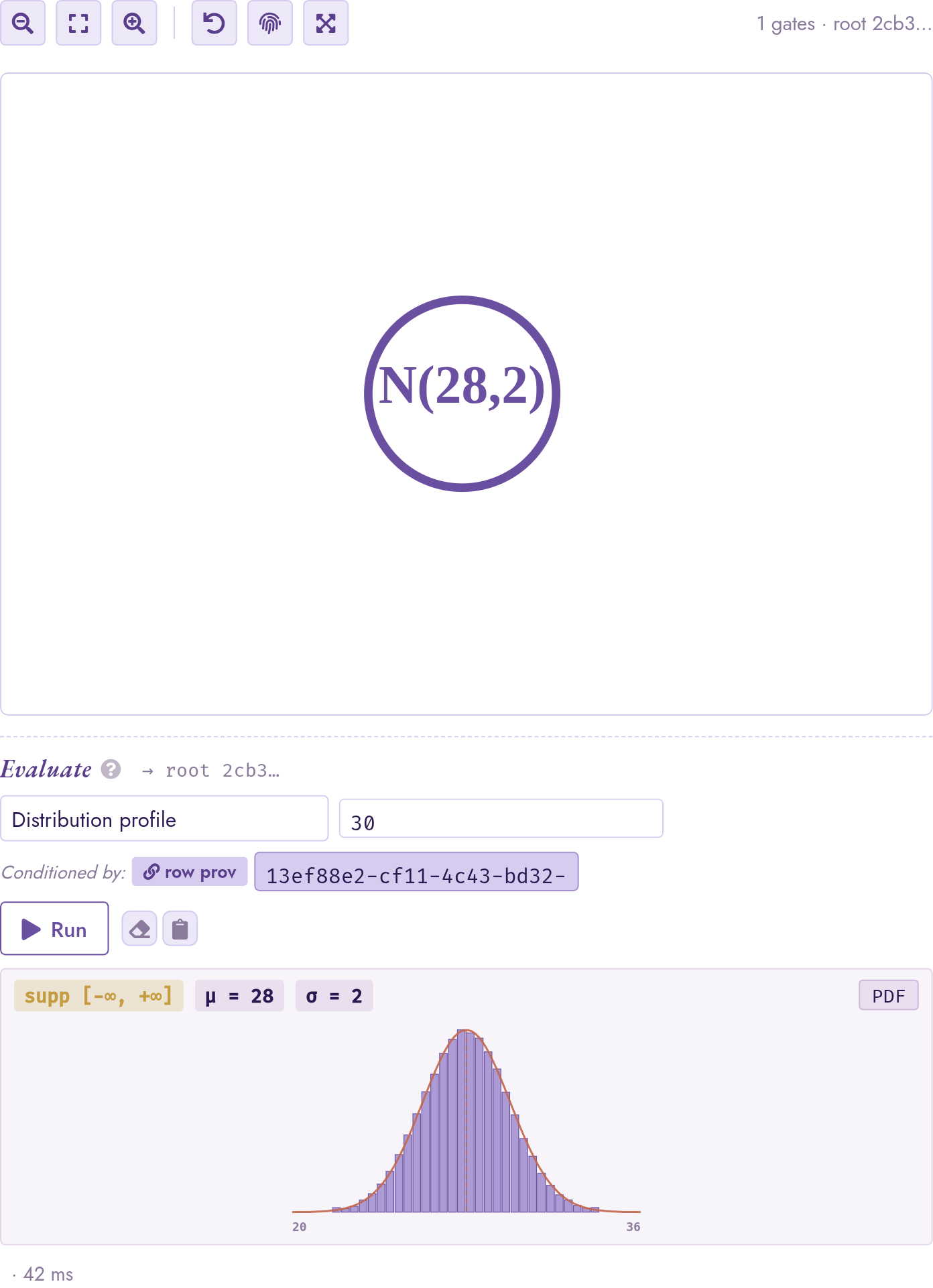
The gate_rv leaf for pm25 on row 1 is a N(28, 2)
circle; the eval-strip Distribution profile panel shows the
, , , support, and an inline histogram.
When the gate has a closed-form family (here a bare Normal),
Studio overlays the analytical PDF on top of the bars.
Step 2: A First Probabilistic Threshold
The Unhealthy category begins above 35.1. Find
the rows whose reading might cross it:
SELECT id, station_id, ts
FROM readings
WHERE pm25 > 35
Because pm25 is a random variable, the comparison is not a
yes/no test: it stands for the event “this reading exceeds 35”,
and ProvSQL attaches that event to each row’s provenance.
Click into a result row’s auto-added provsql cell. Circuit mode shows the
Boolean wrapper (a gate_times over the row’s input token and
the gate_cmp); the cmp’s child link reaches into the
gate_rv from Step 1.
The eval strip’s Marginal probability entry exposes the
full method catalogue (see the chapter on probabilities). Pick
monte-carlo and set n = 10000; the panel returns the
probability with a Hoeffding confidence band. Pin
provsql.monte_carlo_seed = 42 in the Config panel and re-run:
the result is now identical across runs. Toggle the seed back to
-1 and re-run to see the band shift between runs.
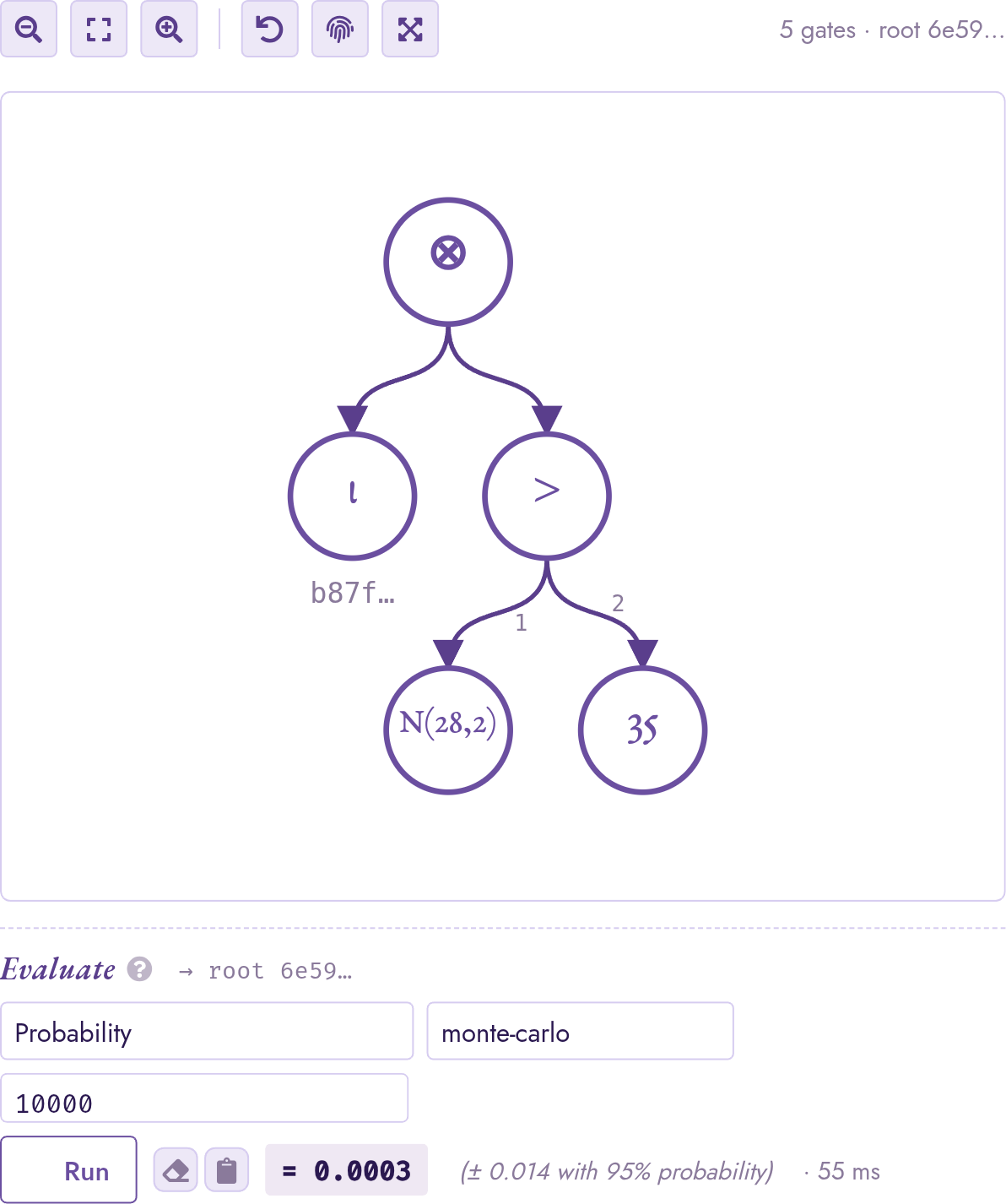
The provenance of one row from WHERE pm25 > 35: a
gate_times (⊗) wraps the row’s input token ι and a
gate_cmp > whose children are the N(28, 2) leaf and
the constant 35. The eval strip below switches to
probability_evaluate and exposes the method picker.
Step 3: The Simplifier in Action
The planner hook emits the comparator as a raw gate_cmp
regardless of what its operands look like. A simplifier pass
then folds comparators whose answer can be decided from the
operand support alone, for example, U(10, 22) > 35 is
universally false because the uniform’s upper bound is below the
threshold. The fold is controlled by provsql.simplify_on_load
(default on), which the Config panel exposes under Provenance.
Click into row 2’s auto-added provsql cell from the Step 2
result (station s2, pm25 ~ U(10, 22)). With
provsql.simplify_on_load on, the canvas shows a single
𝟘 (zero) gate: the simplifier resolved the comparator to a
constant-false leaf and dropped the whole subtree. Toggle the
GUC off in the Config panel and click the cell again: the canvas
now shows the raw construction shape, a gate_times (⊗)
over the row’s input token ι and a gate_cmp (>)
whose children are the U(10, 22) leaf and the constant
35. Both views are semantically identical; the simplified
view is what the semiring evaluators and the Monte-Carlo sampler
actually consume.
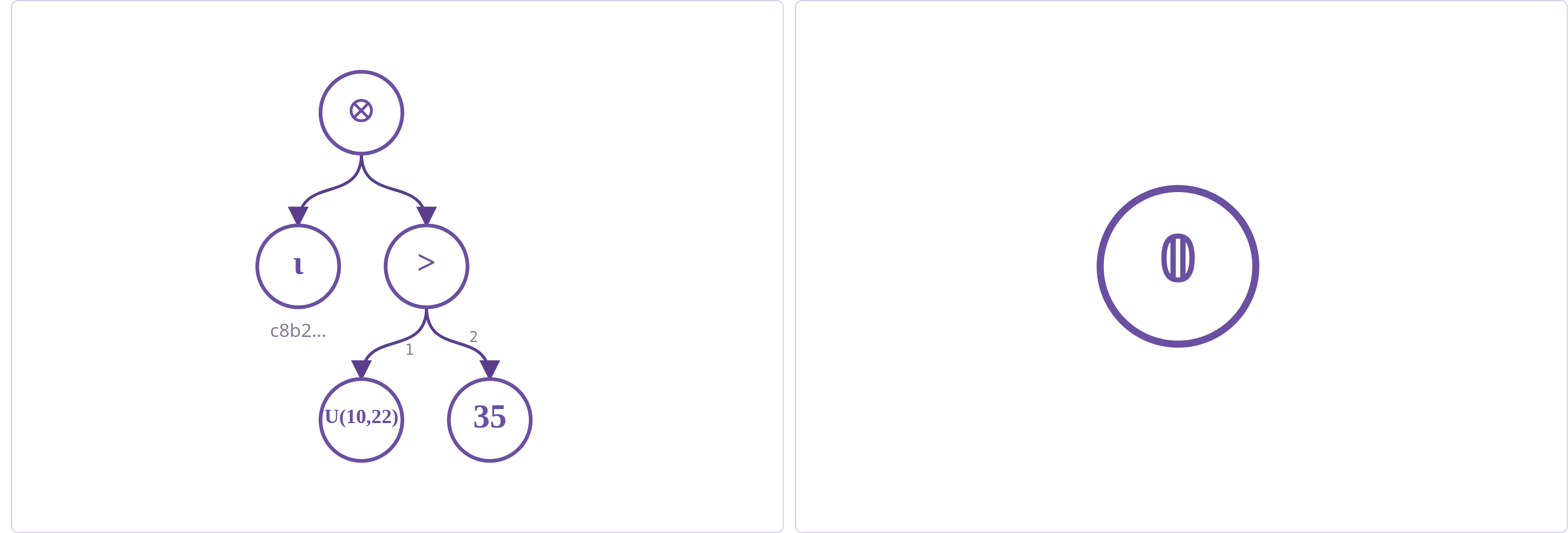
Row 2’s provenance for pm25 > 35 with
provsql.simplify_on_load toggled off (left) vs on (right).
The simplifier recognised that the upper bound of
U(10, 22) is below the threshold, so the comparator is
universally false and the whole subtree collapses to the
additive identity 𝟘.
Step 4: Calibration via Mixtures
Each station has a probability of being mis-calibrated; a
mis-calibrated unit over-reports by 20% (the reading it
records is 1.2 times the true value). The corrected estimate
of the true reading is therefore pm25 with probability p
(the station is in spec) and pm25 / 1.2 with probability
1 - p (the report needs to be scaled back). Express this as
a Bernoulli mixture:
SELECT r.id, r.station_id,
       provsql.mixture(cs.p, r.pm25, r.pm25 / 1.2) AS pm25_calibrated
FROM readings r JOIN calibration_status cs USING (station_id)
WHERE r.station_id = 's1'
Click into a result row’s pm25_calibrated cell. Circuit mode
renders the gate_mixture as a Mix node with three
labelled outgoing edges (p / x / y) matching the SQL
constructor’s argument order: p points to the Bernoulli
mixing probability, x to the in-spec arm, and y to the
correction arm.
The same node-inspector panel exposes Distribution profile
on the mixture root. Because station s1 is in spec 95% of
the time, the histogram is dominated by the N(28, 2) arm and
the out-of-spec N(23.33, 1.667) contributes only a small
left shoulder rather than a visually distinct second mode; the
panel headline reflects this with a mixture mean slightly below
28. To see clear bimodality, re-run the query with a larger
calibration error, e.g. replace r.pm25 / 1.2 with
r.pm25 / 2.0 so the out-of-spec arm folds to N(14, 1),
well separated from the in-spec N(28, 2); the two peaks
then show up distinctly on the histogram even at the 95%/5%
weighting.
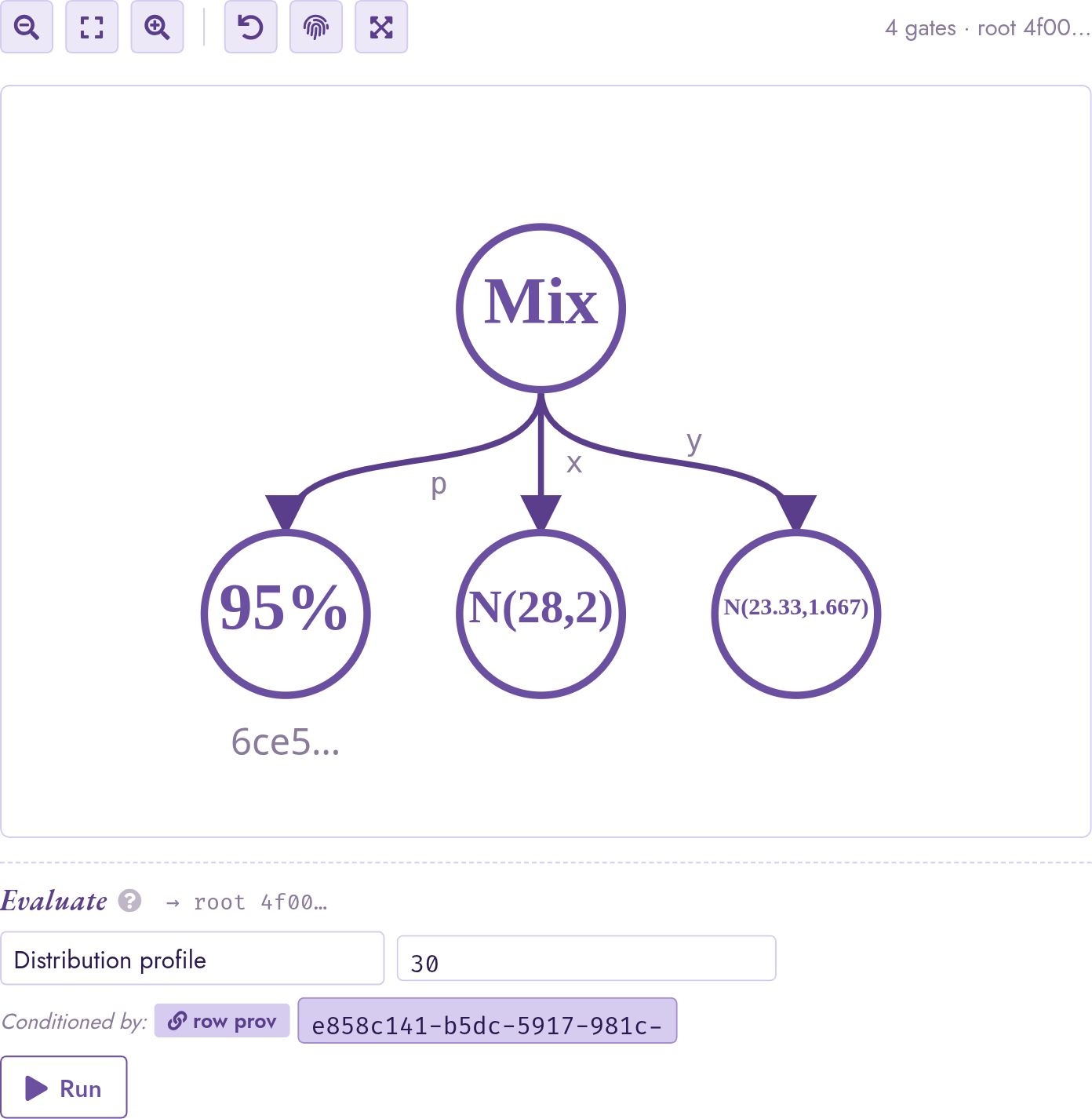
The gate_mixture for the calibrated reading. The
95% child is the Bernoulli probability that station s1
is in spec; the x arm is the raw reading N(28, 2); the
y arm is the back-scaled estimate pm25 / 1.2, which the
simplifier folded through the Normal affine-shift rule into a
single gate_rv N(23.33, 1.667). Circle labels show four
significant figures; the inspector pinned to either child
surfaces the full-precision parameters.
Step 5: Aggregation Over Random Variables
Compute average per district:
SELECT s.district,
       avg(r.pm25)  AS avg_pm25,
       sum(r.pm25)  AS total_pm25
FROM readings r JOIN stations s ON s.id = r.station_id
GROUP BY s.district
Click into a row’s avg_pm25 cell. Circuit mode shows the
avg lowering: a gate_arith(DIV, num, denom)
over two gate_arith(PLUS, …) subtrees, each child a per-row
gate_mixture produced by rv_aggregate_semimod.
The right child of the outer division is the count of included
rows under their per-row provenance: rows whose provenance is
false contribute the additive identity to both numerator and
denominator. Run Distribution profile on the root: the panel
shows the per-district average as a tight distribution centred at
the inclusion-weighted mean.
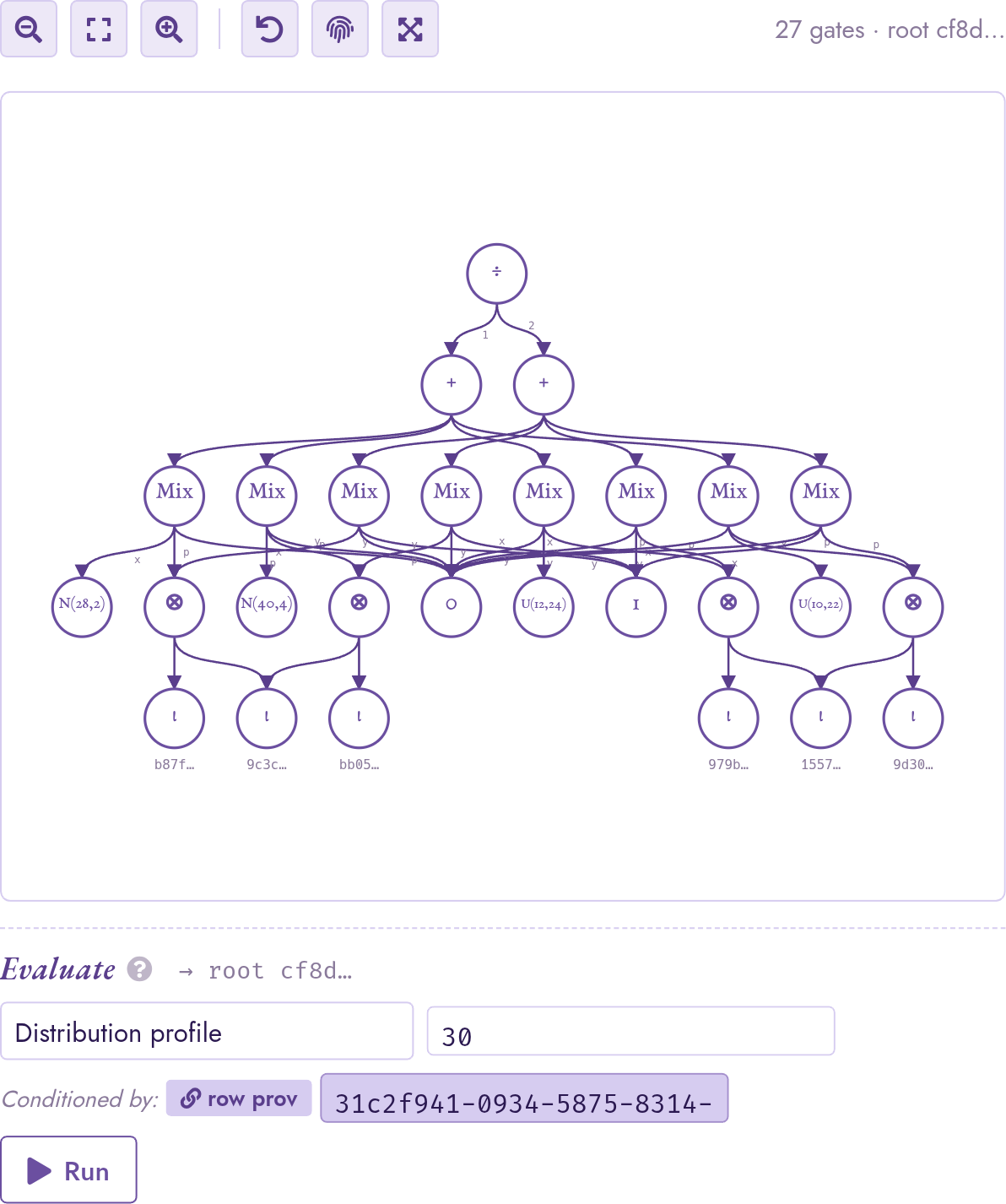
The avg(pm25) cell for the centre district lowers to
gate_arith(DIV, gate_arith(PLUS, mixtures), gate_arith(PLUS,
one-mixtures))
. The eight Mix nodes are the district’s four
readings (two stations × two timestamps), each appearing once
under the numerator’s sum and once under the denominator’s count;
the gate_rv leaves at the bottom are the per-reading
distributions; the ι leaves anchor each row’s provenance.
Step 6: Conditional Inference
Re-open the filtered query from Step 2:
SELECT id, station_id, ts, pm25
FROM readings
WHERE pm25 > 35
  AND station_id = 's1'
Click a result row’s pm25 cell. The eval strip’s
Condition on text input auto-presets to the row’s
provenance UUID, and the Conditioned by: badge
underneath the input is active. Pick Distribution profile and
run: the histogram now shows the truncated shape, restricted to
the tail above 35. Pick Moment with k = 1 and raw:
the panel returns the closed-form Mills-ratio mean of the
truncated normal,
exactly 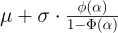 with
with
 . Click the active badge to
clear the conditioning; the panel reverts to the unconditional
mean . Click the muted badge to restore the row
provenance.
. Click the active badge to
clear the conditioning; the panel reverts to the unconditional
mean . Click the muted badge to restore the row
provenance.
The closed-form truncation table covers every family implementing
truncated moments – Normal (Mills ratio), Uniform (intersected
support), Exponential (memorylessness on a lower bound or
finite-interval truncation), Log-normal, Weibull, Pareto (tail
self-similarity), and Beta. For other shapes,
the joint circuit between pm25 and the row’s provenance is
loaded with shared gate_rv leaves correctly coupled, and the
conditional moment is estimated by rejection sampling at budget
provsql.rv_mc_samples.
![The Distribution profile panel showing supp [35, +infinity], mu approximately 40.82, sigma approximately 3.35; the Condition on input is populated with the row's provenance UUID and the Conditioned by badge is active.](../_images/condition-on-active.png)
The conditional distribution profile for row 5 (pm25 ∼
N(40, 4)) under the event pm25 > 35. Studio auto-presets
the Condition on input with the row’s provenance UUID and
activates the Conditioned by badge; the panel’s header
reflects the truncated support [35, +∞] and the
Mills-ratio mean μ ≈ 40.82, σ ≈ 3.35 (closed form on
the truncated normal).
Step 7: Diagnostic Sampling
For raw inspection or downstream analytics, draw samples from the
conditional distribution. With the same row pinned and the
Conditioned by badge active, pick Sample from the
Distribution group; set n = 200 and run. The result panel
shows a six-value inline preview with a “show full list”
expander; clicking it dumps all 200 samples.
For shapes that fall outside the closed-form table the sampler
falls back to rejection sampling at the
provsql.rv_mc_samples budget; if the conditioning event is
so unlikely that fewer than n samples land inside that
budget, the panel surfaces a hint pointing at the GUC, e.g.
MC accepted 47/200. Raise provsql.rv_mc_samples in the
Config panel to widen the rejection-sampling budget.
Re-running with a larger budget (set rv_mc_samples = 50000
in the Config panel) recovers the full batch.
Step 8: Combining Batches via UNION
Both batches share the same id space (rows 1 through 8,
one per (station, timestamp) slot), so a UNION (without
ALL) over (station_id, id) deduplicates a slot to a
single result row whose provenance combines today’s reading and
yesterday’s reading via the semiring addition. With
WHERE pm25 > 35 lifted on each branch, each contributing row
carries a gate_cmp(pm25 > 35) of its own:
(SELECT station_id, id FROM readings            WHERE pm25 > 35)
UNION
(SELECT station_id, id FROM historical_readings WHERE pm25 > 35)
ORDER BY station_id, id
Pick a result row’s provsql cell: Circuit mode shows a
gate_plus (⊕) over the two contributing inputs (today’s
row and yesterday’s row), each carrying its own
gate_cmp(pm25 > 35) from the lifted WHERE.
probability_evaluate(provenance()) on the result gives the
probability that at least one of the two days produced an
Unhealthy reading for that slot. We deliberately keep the
random_variable pm25 column out of the SELECT: there
is no duplicate-elimination semantics for random_variable,
so a UNION over an RV column would have no well-defined
meaning.
Step 9: Filtering Grouped Random Variables by Expected Value
Filter the per-district aggregates from Step 5 by their expected
average. Because avg over a random_variable column
returns a random_variable (not an agg_token), and
expected collapses it to a plain double, the
HAVING qual is deterministic from the planner-hook’s perspective;
the rewrite leaves it for PostgreSQL to evaluate natively while
still adding a delta(gate_agg) wrapper to each surviving
group’s provenance:
SELECT s.district, avg(r.pm25) AS avg_pm25
FROM readings r JOIN stations s ON s.id = r.station_id
GROUP BY s.district
HAVING expected(avg(r.pm25)) > 20
The inner avg is recognised as a random_variable
aggregate (gate_arith DIV over per-row gate_mixture children, as
in Step 5); expected collapses the distribution to its
mean (Monte Carlo here, since the DIV gate has no closed-form
evaluator); the > 20 is a plain comparison on a double,
so the row survives iff its expected average exceeds the
threshold. For the case-study fixture both districts pass
(centre at ≈ 25.5, east at ≈ 21.6); clicking either result row’s
provsql cell shows the delta(gate_agg) shape, identical
to the no-HAVING aggregate from Step 5 but filtered to the
surviving groups.
Step 10: Independent vs Monte Carlo
For threshold queries whose contributing rows have structurally
independent provenance, the 'independent' probability method
(see the chapter on probabilities) is exact
and far cheaper than Monte
Carlo. Compare two exact methods against
monte-carlo on the Step 2 query:
SELECT id,
  probability_evaluate(provenance(), 'independent')         AS p_ind,
  probability_evaluate(provenance(), 'monte-carlo', '10000') AS p_mc,
  probability_evaluate(provenance(), 'tree-decomposition')  AS p_td
FROM readings WHERE pm25 > 35
Studio’s eval strip exposes these methods directly; running each
method against the same pinned subnode shows the analytic
independent and tree-decomposition returning the same
value to full precision, while monte-carlo returns a
Hoeffding-bounded estimate that tightens as n grows.
Step 11: The Worst Reading in a District
Which district had the worst air this morning? The question asks
for the distribution of the maximum over each district’s
readings – an order statistic, not a sum. The max aggregate
over a random_variable column builds exactly that:
SELECT s.district, max(r.pm25) AS worst,
       expected(max(r.pm25)) AS worst_mean
FROM readings r JOIN stations s ON s.id = r.station_id
GROUP BY s.district
ORDER BY s.district
The centre district’s worst reading averages ≈ 40.0 – its
N(40, 4) reading dominates the maximum – and east comes out
at ≈ 39.2, driven by the heavy right tails of Exp(0.04) and
erlang(3, 0.1) even though both means sit near 25–30. Note how
the extremum tells a different story from Step 5’s averages
(≈ 25.5 and ≈ 21.6): the east district looks fine on average and
just as alarming at the extreme. worst_mean itself is a plain
number – expected has already collapsed the distribution to
its mean – which is why the query also projects the unreduced
aggregate: the worst cell is a clickable random_variable
token whose circuit is a gate_arith MAX root over the
per-row mixtures; a row absent in a world contributes -∞, the
order-statistic identity, so it never perturbs the maximum.
Because the children here are mixtures (not bare leaves), the
expectation is estimated by Monte Carlo.
The same-row form is greatest / least – the SQL keywords,
lifted over random_variable arguments by the planner hook; in a
query that involves no provenance-tracked relation, reach them
through the schema-qualified provsql.greatest(…) /
provsql.least(…) constructors instead, as Step 15 does:
SELECT greatest(a.pm25, b.pm25) AS worse,
       expected(greatest(a.pm25, b.pm25)) AS worse_of_two
FROM readings a, readings b
WHERE a.id = 1 AND b.id = 2
Clicking the worse cell shows the same gate_arith MAX
root, but here the children are independent bare leaves
(N(28, 2) and U(10, 22)), so the mean is computed
analytically by the layer-cake integral – ≈ 28.00003, barely above
the normal’s mean, since the uniform almost never wins.
Step 12: Percentiles and Exceedance Margins
quantile reads the inverse CDF off any reading –
the natural regulatory question is “what level is only exceeded
5% of the time?”:
SELECT id, station_id, quantile(pm25, 0.95) AS p95
FROM readings
WHERE id IN (1, 3, 5, 7)
ORDER BY id
Each family answers through its own inverse CDF: the normals give
μ + 1.645·σ (≈ 31.29 for N(28, 2), ≈ 46.58 for
N(40, 4)), the exponential gives −ln(0.05)/λ ≈ 74.89, and
the Erlang – which has no elementary inverse – is bisected on its
closed-form CDF to ≈ 62.96. No sampling is involved in any of
these. The same readout is available interactively: with a
pm25 cell pinned, pick Quantile from the Distribution
group of the eval strip, set the fraction p, and run.
Quantiles compose with conditioning: the median of a reading
given that it crossed the Unhealthy line is the p = 0.5
quantile of the truncated distribution, again in closed form:
SELECT id, quantile(pm25, 0.5, provenance()) AS median_given_high
FROM readings
WHERE pm25 > 35 AND station_id = 's1'
ORDER BY id
Row 1 (N(28, 2), for which the event is a far tail) gives
≈ 35.36, just above the threshold; row 5 (N(40, 4)) gives
≈ 40.53. In the eval strip, the same conditioning rides on the
Conditioned by badge from Step 6: with it active, Quantile
returns the truncated-distribution quantile.
Step 13: Expected Excess via CASE
How far above the threshold does a station land, on average?
The excess max(pm25 − 35, 0) is a piecewise transform, written
as a searched CASE (which the planner lowers into a
gate_case guarded selection, see the continuous
distributions chapter):
SELECT id,
       expected(CASE WHEN pm25 > 35 THEN pm25 - 35
                     ELSE as_random(0) END) AS expected_excess
FROM readings
WHERE station_id = 's1'
ORDER BY id
The guard and the branches read the same pm25, and a piecewise
function of one random variable is among the CASE shapes whose
moments come back in closed form: the expectation integrates each
branch over its guard’s region, so the correlation between “the
reading exceeded 35” and “by how much” is preserved exactly, with
no sampling – the answers hold even under
SET provsql.rv_mc_samples = 0. Row 1 returns ≈ 0.0001 –
N(28, 2) essentially never crosses – while row 5 returns the
closed-form partial expectation
 with
, ≈ 5.2023 for
with
, ≈ 5.2023 for N(40, 4), to
full precision. Note the explicit as_random(0) (or
equivalently 0::random_variable) on the ELSE branch:
CASE type resolution needs the branches in a single type
category, so a bare numeric literal will not lift on its own.
Step 15: Drift, Lifetime, and Spikes: More Families
The vendor spec sheets bring in three more families, all available as constructors (see the chapter on continuous distributions). The multi-pass unit’s zero drift accumulates as a Gamma; its per-batch drift check is a chi-squared test statistic:
SELECT expected(provsql.gamma(2.5, 0.5))       AS drift_mean,
       variance(provsql.gamma(2.5, 0.5))       AS drift_var,
       quantile(provsql.chi_squared(4), 0.95)  AS chi2_crit
gamma(k = 2.5, λ = 0.5) has mean k/λ = 5 and variance
k/λ² = 10, both exact; the χ²₄ critical value comes out
≈ 9.4877, bisected on the regularised-incomplete-gamma CDF.
Sensor lifetimes are Weibull. A station carrying two redundant units fails over to the second when the first dies; the time to first failure is the minimum of the two lifetimes:
SELECT expected(provsql.least(provsql.weibull(1.5, 4.0),
                              provsql.weibull(1.5, 4.0))) AS first_failure,
       expected(provsql.weibull(1.5, 4.0))                AS single_lifetime
A single weibull(k = 1.5, λ = 4) unit lasts
λ·Γ(1 + 1/k) ≈ 3.61 years on average; the minimum of two
i.i.d. Weibulls is again Weibull (min-stability), so the first
failure at ≈ 2.27 years is computed in closed form.
Construction-season episodic spikes are heavy-tailed – a Pareto over a 30 μg/m³ floor:
SELECT expected(provsql.pareto(30, 2.5))       AS spike_mean,
       quantile(provsql.pareto(30, 2.5), 0.95) AS spike_p95,
       expected(provsql.pareto(30, 1.0))       AS undefined_mean
The α = 2.5 spike averages α·xₘ/(α−1) = 50 with a 95th
percentile near 99.4 – the heavy tail at work. The last column
shows moment honesty: pareto(30, 1) has no finite mean, and
ProvSQL reports Infinity rather than estimating a divergent
integral.
Finally, does a spike beat the noisy high reading? A Pareto vs Normal comparison has no registered closed form, so ProvSQL integrates the pair by quadrature – exact-grade, no sampling:
SELECT probability(x > y) AS p_spike_beats_normal
FROM (SELECT provsql.pareto(30, 2.5) AS x,
             provsql.normal(45, 5)   AS y) t
which returns ≈ 0.384: even though the spike’s mean (50) is above the normal’s (45), the spike spends most of its mass near its 30 floor and only wins through its tail.
Step 16: Fleet Statistics Under Sensor Dropout
Every reading so far contributed unconditionally. Today’s maintenance log says otherwise: a station out of calibration silently drops out of the feed. Pin each reading’s provenance probability to its station’s calibration probability, so a row is present only when its station is in calibration:
SELECT set_prob(provenance(),
                (SELECT p FROM calibration_status cs
                  WHERE cs.station_id = r.station_id))
FROM readings r
The calibration probability is fetched through a scalar subquery
so that provenance() stays the readings row’s own input
token: joining the two tracked tables instead would make it the
joint row provenance (a times gate), which set_prob
cannot pin. ProvSQL warns that the subquery’s data is read
outside provenance tracking (“treated as certain”) – exactly the
intent here: p parameterises the presence model, it is not
uncertain data itself.
The SQL-standard statistic aggregates (stddev_pop /
stddev_samp, covar_pop / covar_samp /
corr, and the ordered-set percentile_cont) are
lifted to random_variable rows with exactly these semantics: a
row absent in a world drops out of every sum, the count, and the
percentile’s member set. Start where the answer is checkable by
hand – the reference station is always in calibration (p = 1)
and its readings are lab-grade constants 15.0 and 16.5:
SELECT expected(stddev_pop(pm25))     AS sd_ref,
       expected(corr(pm25, pm25 * 2)) AS corr_ref
FROM readings
WHERE station_id = 's4'
Both statistics are Dirac – every Monte-Carlo draw is the same
world and the same constants – so the answers are exact:
sd_ref = 0.75 (the population stddev of {15, 16.5}) and
corr_ref = 1 (a reading is perfectly correlated with its own
rescaling, drawn once and observed by both argument positions).
Now the probabilistic fleet: the median reading per district, where dropout changes the member set itself – when Riverside Park is out of calibration (30% of days), both of its rows leave the group:
SELECT s.district,
       expected(percentile_cont(0.5)
                WITHIN GROUP (ORDER BY r.pm25)) AS median_pm25
FROM readings r JOIN stations s ON s.id = r.station_id
GROUP BY s.district
The percentile_cont gate carries every row’s presence
indicator alongside its value (pin the result node and look for
the p50 circle in the canvas): per draw, the sampler keeps
the values whose station is in calibration, sorts them, and
interpolates. Under dropout the centre district’s expected median
lands around 26 – pulled between the two Normal City-Centre
readings and the two lower Riverside uniforms that are only
present 70% of the time.
Step 17: A Maintenance-Triage Headline via CASE over Aggregates
Which district needs the maintenance crew first? The desk wants a
single headline number per district: if even the weakest
station’s calibration confidence clears 0.8, report the district’s
total confidence weight; otherwise flag the weakest station (the
crew’s target). That is a CASE whose guards and branches
are aggregates – the aggregate-carrier CASE (see the
aggregation chapter), lowered to an agg_case
guarded selection. (The exact machinery covers sum / count
/ min / max guards and branches; an avg branch inside a
CASE takes the Monte-Carlo path, its exact arm being
unconditional-only.) First make the maintenance log itself
uncertain (each record is confirmed with a probability) and the
station registry certain:
DO $$ BEGIN
  PERFORM set_prob(provenance(), 1.0) FROM stations;
  PERFORM set_prob(provenance(),
                   CASE station_id WHEN 's1' THEN 1.0
                                   WHEN 's2' THEN 0.8
                                   WHEN 's3' THEN 0.7
                                   ELSE 1.0 END)
    FROM calibration_status;
END $$
One record per district is kept certain, so each district’s group exists in every world (an all-absent group would produce no headline row at all).
SELECT s.district,
       CASE WHEN min(cs.p) > 0.8 THEN sum(cs.p)
            ELSE min(cs.p) END AS confidence_headline
FROM calibration_status cs JOIN stations s ON s.id = cs.station_id
GROUP BY s.district
The result cells display as 0.7 (*) and 0.6 (*) – the
CASE evaluated on the actual data (with every record
confirmed, both districts have a weak link below the bar, so each
headlines its worst station), with the (*) marking a
probabilistic aggregate whose value is world-dependent.
The headline’s distribution is evaluated exactly – possible-worlds
decomposition over the first-match regions, no Monte Carlo, correct
even under SET provsql.rv_mc_samples = 0:
SELECT s.district,
       expected(CASE WHEN min(cs.p) > 0.8 THEN sum(cs.p)
                     ELSE min(cs.p) END) AS expected_headline
FROM calibration_status cs JOIN stations s ON s.id = cs.station_id
GROUP BY s.district
For the centre district there are exactly two worlds: with both
records confirmed (probability 0.8) the weakest link 0.70
misses the bar and is the headline; with only City Centre’s
record confirmed (0.2) the sole confidence 0.95 clears it
and the total 0.95 is reported. So
 exactly – and
that is the value the query returns. The east district works out
to
exactly – and
that is the value the query returns. The east district works out
to  .
.
Step 18: Shared Information in Nats
Step 14 measured the plume coupling with
correlation; mutual_information is its
information-theoretic counterpart – symmetric, in nats, and zero
exactly when the two variables share no randomness:
WITH plume AS (SELECT provsql.normal(0, 3) AS dust)
SELECT mutual_information(a.pm25, b.pm25)  AS mi_indep,
       mutual_information(a.pm25 + p.dust,
                          b.pm25 + p.dust) AS mi_shared
FROM readings a, readings b, plume p
WHERE a.id = 1 AND b.id = 2
mi_indep is exactly 0 with no sampling at all: the two
raw readings have disjoint stochastic-leaf footprints, the same
structural-independence test the moment evaluators use. The
plume-shifted pair shares the dust leaf, and the readout
estimates their mutual information by a 2-D histogram over
coupled joint draws (each iteration draws the shared plume once
and both sums observe it) – about 0.21 nats at seed 42. For
a jointly-Gaussian pair with the Step 14 correlation
 the closed form would give
 ; the estimate lands
in that neighbourhood, a little above: the pair is not jointly
Gaussian (Riverside’s noise is uniform), and the plug-in histogram
estimator carries a small upward bias.
; the estimate lands
in that neighbourhood, a little above: the pair is not jointly
Gaussian (Riverside’s noise is uniform), and the plug-in histogram
estimator carries a small upward bias.
Step 19: An Offline Sensor Reports NULL
Sensors go offline. When Riverside Park misses its 10:00 sample, the
natural encoding is a row whose pm25 is SQL NULL – there is no
reading, not even an uncertain one:
INSERT INTO readings (id, station_id, ts, pm25)
VALUES (9, 's2', '2026-05-12 10:00', NULL);
Three things follow, each matching plain SQL:
Threshold events are unknown, never true.
WHERE pm25 > 35over the offline row is unknown under SQL’s three-valued logic in every possible world, so the lifted comparison annotates the row with the circuit’s zero –probability_evaluatereturns exactly 0, with no sampling. (A NULL reading is not “certainly exceeding”, and not “possibly exceeding” either: it is no evidence at all.)Null tests are ordinary and deterministic.
WHERE pm25 IS NULLfinds the offline row like any other predicate; PostgreSQL evaluates it and provenance simply carries the row’s token through.Aggregates skip the offline row.
expected(avg(pm25))over Riverside Park is the same with or without row 9: the NULL reading contributes to neither the sum nor the count. (Internallyavguses a per-row presence indicator that is NULL exactly when the value is, so the offline row drops out of the denominator too.)
Delete the placeholder row to return to the running dataset:
DELETE FROM readings WHERE id = 9;
The general rules – which predicates treat NULLs as unknown and what that means for the circuits – are in the NULL semantics chapter.
See the chapter on continuous distributions for the full surface and the Studio chapter for the Studio reference.