Case Study: Intelligence Agency
This case study, largely extending the scenario introduced when ProvSQL was first presented [Senellart et al., 2018], demonstrates ProvSQL’s custom semiring capability, where-provenance, probability computation with multiple algorithms, and circuit export through a security-classification scenario.
The Scenario
An intelligence agency maintains a database of seven employees spread across three cities. Every employee holds a security clearance ranging from unclassified to top secret. Your tasks:
identify which cities are served by more than one agent,
determine the minimum clearance level needed to infer each result,
find cities with exactly one agent (sensitive: if the city leaks, the sole agent is exposed),
track where in the database each output value originated,
compute the probability that a city remains a single-agent post after accounting for possible-world uncertainty.
Setup
Tip
Prefer not to install? Use the Playground. You can skip the manual
setup below: open this case study as a runnable notebook in the ProvSQL
Playground (every query is a
cell, and the opening cells set up the database for you), or open the bare
cs1 database and run the queries
as you read. The Playground bundles no external tools, so the steps that
call an external knowledge compiler (d4, c2d…) or the graph-easy
ASCII renderer (view_circuit) detect its absence and report it
instead of returning a result – the cells still run cleanly; the default
probability methods work throughout (they use the built-in
tree-decomposition compiler), as does everything else. See the
Playground note.
This case study assumes a working ProvSQL installation (see
Getting ProvSQL). Download setup.sql
and load it into a fresh PostgreSQL database:
psql -d mydb -f setup.sql
This creates:
classification_level– an ordered ENUM (unclassified<restricted<confidential<secret<top_secret<unavailable) whereunavailableis a sentinel representing the semiring 𝟘 (no derivation possible)personnel– 7 agents with name, position, city, and clearance level
Step 1: Explore the Database
At the start of every session, set the search path so that ProvSQL functions
can be called without the provsql. prefix:
SET search_path TO public, provsql;
Inspect the personnel table:
SELECT * FROM personnel ORDER BY id;
You should see seven rows: Juma (Director, Nairobi), Paul (Janitor, Nairobi), David (Analyst, Paris), Ellen (Field agent, Beijing), Aaheli (Double agent, Paris), Nancy (HR, Paris), and Jing (Analyst, Beijing).
Step 2: Enable Provenance and Create a Name Mapping
Enable provenance tracking on personnel and create a mapping so that
provenance tokens can be labelled with agent names:
SELECT add_provenance('personnel');
DROP TABLE IF EXISTS personnel_name;
SELECT create_provenance_mapping('personnel_name', 'personnel', 'name');
After add_provenance, every row of personnel has a unique UUID
token in its hidden provsql column. The mapping personnel_name
associates each token with the corresponding agent’s name.
Step 4: Minimum Security Clearance (sr_minmax)
For each shared city, what is the minimum clearance level required to have inferred that the city has multiple agents? An analyst who knows the city only needs to see the lowest-cleared agent there.
This is the security shape of the min-max m-semiring, computed by the
compiled function sr_minmax over the classification_level
enum:
⊕(OR combination) =min: to infer either agent was involved, you only need clearance for the less-classified one (one witness suffices to establish the disjunction).⊗(AND/join) =max: to confirm both agents are present, you need clearance for the more-classified one (you must be able to access both records to establish the join).
The third argument is a sample value of the carrier enum (used only for type inference); its value is ignored:
DROP TABLE IF EXISTS personnel_level;
SELECT create_provenance_mapping('personnel_level',
                                 'personnel', 'classification');

SELECT p1.city,
       sr_minmax(provenance(), 'personnel_level',
                 'unclassified'::classification_level) AS min_clearance
FROM personnel p1
JOIN personnel p2 ON p1.city = p2.city AND p1.id < p2.id
GROUP BY p1.city
ORDER BY p1.city;
Results: Nairobi requires restricted (Paul is the more-classified of
the two agents, and both must be accessed to confirm the pair). Beijing
requires secret (both Ellen and Jing hold the same level). Paris
requires confidential: the pair David–Nancy has MAX clearance
confidential, which is the lowest maximum among all Paris pairs,
so confidential clearance suffices to confirm at least one pair.
Step 5: Cities with Exactly One Agent (EXCEPT / Monus)
A city with a single agent is sensitive: knowing the city immediately
identifies the agent. Find cities where all agents are alone using
EXCEPT:
SELECT city,
       sr_formula(provenance(), 'personnel_name') AS formula
FROM (
    SELECT DISTINCT city FROM personnel
  EXCEPT
    SELECT p1.city
    FROM personnel p1
    JOIN personnel p2 ON p1.city = p2.city AND p1.id < p2.id
    GROUP BY p1.city
) t
ORDER BY city;
Note
ProvSQL’s EXCEPT uses the monus operator ⊖ of the
provenance semiring rather than plain set difference. Every city
appears in the result with a provenance formula; the formula
evaluates to 𝟘 for cities that are definitely shared and to a
non-trivial expression for cities that could be single-agent in
some possible world. Nairobi’s formula
(Juma ⊕ Paul) ⊖ (Juma ⊗ Paul) reads: “at least one of Juma
or Paul is present, minus the event where both are.”
Step 6: Where-Provenance
Where-provenance tracks which column of which input row produced each output value. Enable it and re-run the shared-city query:
SET provsql.provenance = 'where';

SELECT p1.city,
       where_provenance(provenance()) AS source
FROM personnel p1
JOIN personnel p2 ON p1.city = p2.city AND p1.id < p2.id
GROUP BY p1.city
ORDER BY p1.city;

SET provsql.provenance = 'semiring';
Each city output value is traced back to the city column (column 4)
of the personnel table for every agent in that city. The notation
[personnel:〈token〉:4;...] shows the token and column index of each
contributing row; the trailing [] is the untracked source
column itself.
Step 7: Assign Probabilities
Suppose the existence of each agent in the database is uncertain.
Assign each agent a probability equal to id / 10.0:
ALTER TABLE personnel ADD COLUMN IF NOT EXISTS probability DOUBLE PRECISION;
UPDATE personnel SET probability = id / 10.0;

DO $$ BEGIN
  PERFORM set_prob(provenance(), probability) FROM personnel;
END $$;
Now Juma has probability 0.1, Paul 0.2, …, Jing 0.7.
Step 8: Probability – Exact
Compute the exact probability that each city is a single-agent city:
SELECT city,
       ROUND(probability_evaluate(provenance())::numeric, 4) AS prob
FROM (
    SELECT DISTINCT city FROM personnel
  EXCEPT
    SELECT p1.city
    FROM personnel p1
    JOIN personnel p2 ON p1.city = p2.city AND p1.id < p2.id
    GROUP BY p1.city
) t
ORDER BY city;
Nairobi (agents with probabilities 0.1 and 0.2) has probability
0.1 × 0.8 + 0.9 × 0.2 = 0.26 of having exactly one agent. Beijing
(0.4 and 0.7) scores 0.54. Paris (0.3, 0.5, 0.6) gives 0.41.
Step 9: Probability – Monte Carlo
For larger circuits, exact evaluation can be expensive. Monte Carlo sampling gives an approximate answer:
SELECT city,
       probability_evaluate(
           provenance(), 'monte-carlo', '10000') AS prob
FROM (
    SELECT DISTINCT city FROM personnel
  EXCEPT
    SELECT p1.city
    FROM personnel p1
    JOIN personnel p2 ON p1.city = p2.city AND p1.id < p2.id
    GROUP BY p1.city
) t
ORDER BY city;
With 10 000 samples the result is accurate to roughly ±0.01
(see Margin of error).
Results will vary slightly between runs due to sampling.
Compare the runtime against the exact method (\timing in psql,
or the per-query timing Studio displays).
Step 10: Probability – Knowledge Compiler
Note
This step uses an external knowledge compiler such as d4 or
dsharp, which must be on your PATH (or in a directory
listed in the provsql.tool_search_path GUC, see
the configuration chapter). The query below
guards the call with tool_available, so where no such
compiler is installed – in particular in the
Playground, which bundles none – it reports
that instead of failing, and you can read on.
A knowledge compiler converts the provenance circuit to a d-DNNF representation, which enables efficient exact probability evaluation on large circuits of specific forms:
SELECT city,
       CASE WHEN tool_available('d4')
            THEN ROUND(probability_evaluate(
                     provenance(), 'compilation', 'd4')::numeric, 4)::text
            ELSE '(needs external compiler d4; unavailable here)'
       END AS prob
FROM (
    SELECT DISTINCT city FROM personnel
  EXCEPT
    SELECT p1.city
    FROM personnel p1
    JOIN personnel p2 ON p1.city = p2.city AND p1.id < p2.id
    GROUP BY p1.city
) t
ORDER BY city;
Compare the runtime (\timing in psql, or Studio’s per-query
timing) against the possible-worlds and
Monte Carlo methods. On this small example, the external knowledge
compiler will be slower than the other methods: invoking an external
process and compiling the circuit carries significant overhead that
only pays off on much larger circuits.
Step 11: Visualise a Provenance Circuit
view_circuit renders the provenance circuit as an ASCII
box-art diagram using
graph-easy
(which must be on your PATH). The query guards the call with
tool_available, so without graph-easy – in particular in
the Playground, where Studio’s interactive
circuit mode is the better view anyway – it says so
rather than failing:
SELECT city,
       CASE WHEN tool_available('graph-easy')
            THEN view_circuit(provenance(), 'personnel_name')
            ELSE '(needs the graph-easy renderer; use Studio circuit mode)'
       END AS circuit
FROM (
    SELECT DISTINCT city FROM personnel
  EXCEPT
    SELECT p1.city
    FROM personnel p1
    JOIN personnel p2 ON p1.city = p2.city AND p1.id < p2.id
    GROUP BY p1.city
) t
WHERE city = 'Nairobi';
The result shows the monus gate at the top, with Juma and
Paul as leaf inputs, rendered in box-art notation in the terminal.
Step 12: Export to XML
to_provxml serialises the provenance circuit to
PROV-XML, the W3C standard for
provenance interchange, which can be processed by any standard XML tool:
SELECT city,
       to_provxml(provenance(), 'personnel_name') AS provxml
FROM (
    SELECT DISTINCT city FROM personnel
  EXCEPT
    SELECT p1.city
    FROM personnel p1
    JOIN personnel p2 ON p1.city = p2.city AND p1.id < p2.id
    GROUP BY p1.city
) t
WHERE city = 'Nairobi';
Step 13: Large Circuit Benchmark
To compare the three probability algorithms at scale, create a synthetic 100 × 100 random-probability matrix and enable provenance tracking on it:
DROP TABLE IF EXISTS matrix CASCADE;
CREATE TABLE matrix AS
SELECT ones.n + 10 * tens.n AS x,
       other.n + 10 * tens2.n AS y,
       random() AS prob
FROM (VALUES(0),(1),(2),(3),(4),(5),(6),(7),(8),(9)) ones(n),
     (VALUES(0),(1),(2),(3),(4),(5),(6),(7),(8),(9)) tens(n),
     (VALUES(0),(1),(2),(3),(4),(5),(6),(7),(8),(9)) other(n),
     (VALUES(0),(1),(2),(3),(4),(5),(6),(7),(8),(9)) tens2(n);

SELECT add_provenance('matrix');
DO $$ BEGIN
  PERFORM set_prob(provenance(), prob) FROM matrix;
END $$;
Now run the same path query with each method in turn, timing each
(\timing in psql, or Studio’s per-query timing):
-- Default method (independent evaluation, tree decomposition, or d4)
SELECT m1.x, m2.y,
       probability_evaluate(provenance()) AS prob
FROM matrix m1, matrix m2
WHERE m2.x = m1.y AND m1.x > 90 AND m2.x > 90 AND m2.y > 90
GROUP BY m1.x, m2.y
ORDER BY m1.x, m2.y;
-- Exact enumeration over all possible worlds
SELECT m1.x, m2.y,
       probability_evaluate(provenance(), 'possible-worlds') AS prob
FROM matrix m1, matrix m2
WHERE m2.x = m1.y AND m1.x > 90 AND m2.x > 90 AND m2.y > 90
GROUP BY m1.x, m2.y
ORDER BY m1.x, m2.y;
-- Monte Carlo sampling (9604 samples ≈ 1 % error at 95 % confidence)
SELECT m1.x, m2.y,
       probability_evaluate(provenance(), 'monte-carlo', '9604') AS prob
FROM matrix m1, matrix m2
WHERE m2.x = m1.y AND m1.x > 90 AND m2.x > 90 AND m2.y > 90
GROUP BY m1.x, m2.y
ORDER BY m1.x, m2.y;
-- Tree-decomposition-based exact compilation (built-in, no external tool)
SELECT m1.x, m2.y,
       probability_evaluate(provenance(), 'tree-decomposition') AS prob
FROM matrix m1, matrix m2
WHERE m2.x = m1.y AND m1.x > 90 AND m2.x > 90 AND m2.y > 90
GROUP BY m1.x, m2.y
ORDER BY m1.x, m2.y;
-- Knowledge compilation via external tool d4 (guarded with
-- tool_available, so it reports rather than fails where d4 is
-- absent, e.g. in the Playground)
SELECT m1.x, m2.y,
       CASE WHEN tool_available('d4')
            THEN probability_evaluate(provenance(), 'compilation', 'd4')::text
            ELSE '(d4 unavailable here)'
       END AS prob
FROM matrix m1, matrix m2
WHERE m2.x = m1.y AND m1.x > 90 AND m2.x > 90 AND m2.y > 90
GROUP BY m1.x, m2.y
ORDER BY m1.x, m2.y;
The Monte Carlo query uses 9604 samples, which gives roughly 1 %
additive error with 95 % confidence (by the formula
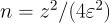 with
with  ,
,
 ;
see Margin of error).
;
see Margin of error).
The 'tree-decomposition' method is exact and built into ProvSQL (no
external binary required). It is often the fastest exact method on simple
queries, but it fails on circuits with high treewidth – when that happens,
fall back to 'compilation' or one of the other methods.
One further method is worth knowing. 'independent' is the cheapest of
all – it multiplies and adds marginal probabilities directly – but it
applies only when the lineage is independent, with no input tuple shared
between the branches of an  or
or  . The path
query above is not independent (the self-join
. The path
query above is not independent (the self-join m2.x = m1.y makes the
two matrix lookups share tuples), so
probability_evaluate(provenance(), 'independent') raises
ProvSQL: Not an independent circuit rather than returning a wrong
answer; it is the method to reach for on genuinely tuple-independent
lineage.
Step 14: The Boolean Expression Behind a Token
sr_boolexpr returns the abstract Boolean formula of a provenance
circuit. Without a mapping it uses internal variable names x0,
x1…; with an optional second argument naming a provenance
mapping table the leaves are labelled by the mapping’s value
column instead. This is the same expression ProvSQL hands to its
d-DNNF compilers internally to compute probabilities.
SELECT city, sr_boolexpr(provenance()) AS boolexpr
FROM (
    SELECT DISTINCT city FROM personnel
  EXCEPT
    SELECT p1.city
    FROM personnel p1
    JOIN personnel p2 ON p1.city = p2.city AND p1.id < p2.id
    GROUP BY p1.city
) t
WHERE city = 'Nairobi';
For Nairobi, the result is the circuit (Juma ⊕ Paul) ⊖ (Juma ⊗ Paul)
from Step 5, interpreted in the Boolean function semiring – every
provenance gate is mapped to its Boolean counterpart (⊕ to ∨,
⊗ to ∧, ⊖ to ∧¬) – and the resulting Boolean function
rendered as a formula over anonymous variables. Unlike
sr_formula, the provenance mapping is optional: the
expression captures the circuit’s logical structure independently of
any naming, and a mapping can be supplied later if you want the
leaves labelled.
Step 15: Programmatic Circuit Inspection
What view_circuit renders, you can also walk programmatically
with the low-level circuit API. Capture Nairobi’s monus token first:
CREATE TEMP TABLE nairobi_token AS
SELECT provenance() AS prov
FROM (
    SELECT DISTINCT city FROM personnel
  EXCEPT
    SELECT p1.city
    FROM personnel p1
    JOIN personnel p2 ON p1.city = p2.city AND p1.id < p2.id
    GROUP BY p1.city
) t
WHERE city = 'Nairobi';
get_nb_gates reports how many gates have been materialized in the
current database’s circuit:
SELECT get_nb_gates();
get_gate_type and get_children give a single-step view
of the gate structure: they return the operator and direct children of a
gate.
SELECT get_gate_type(prov)            AS root_type,
       get_children(prov)             AS root_children
FROM nairobi_token;
For Nairobi, the root is a monus gate with two children: the ⊕
sub-circuit (Juma ⊕ Paul) and the ⊗ sub-circuit (Juma ⊗ Paul).
Recurse to inspect the children:
SELECT (get_children(prov))[1]                        AS plus_token,
       get_gate_type((get_children(prov))[1])         AS plus_type,
       get_children((get_children(prov))[1])          AS plus_children
FROM nairobi_token;
The leaves of the circuit are input gates that originate from the
personnel table. identify_token performs a reverse lookup,
returning the table and column count for an input token:
SELECT identify_token(child) AS source
FROM nairobi_token, unnest(get_children((get_children(prov))[1])) AS child;
Both leaves resolve to (personnel, 6) – the personnel table with
its six non-provenance columns (id, name, position, city,
classification, and the probability column added in Step 7). This
is exactly the traversal view_circuit performs to render the
box-art diagram.