Case Study: Government Ministers Over Time
This case study, introduced in [Widiaatmaja et al., 2025], applies ProvSQL’s temporal extension to a database of French and Singaporean government ministers. Every fact carries the validity interval during which it was true, and we explore that history through Studio’s Temporal mode – a validity timeline with as-of, during, and full-history time operations – with the underlying SQL shown alongside each step.
Note
The data was imported semi-automatically from Wikidata and may contain imprecisions. It was current as of early 2026 and does not reflect subsequent political appointments.
The scenario
A database records which person held which governmental position and when.
Each row has a validity column of type tstzmultirange that describes
the time intervals during which the fact was true. We will:
reconstruct the full history of a person’s positions,
snapshot the government as it stood on a given date,
list everyone who served during a window of time, and
fire an official and then undo that action.
Setup
Tip
Prefer not to install? Use the Playground. Instead of the manual setup below, open the cs4 database in the ProvSQL Playground; it ships this case study’s data pre-loaded and opens straight in Temporal mode, ready to follow along as you read. See the Playground note.
This case study assumes a working ProvSQL installation on PostgreSQL 14 or
later (see Getting ProvSQL). The data files are included in the
ProvSQL source distribution under doc/casestudy4/data/. Run the setup
script from that directory:
cd /path/to/provsql/doc/casestudy4/data
psql -d mydb -f ../setup.sql
This creates three tables – person (politicians, with a
validity tstzmultirange column), holds (which person held which
position in which country, again with a validity), and party
(party memberships) – then:
calls
add_provenanceonpersonandholds,creates maintained
person_validityandholds_validitymappings viacreate_provenance_mapping(maintained => true, so they stay correct when the data is modified later), andextends ProvSQL’s
time_validity_viewto incorporate both.
The convenience view person_position joins person and holds
for French officials; it is the relation we place on the timeline below.
Opening Temporal mode
Point Studio at the database and pick Temporal from the mode switcher (see the mode reference for the full UI):
provsql-studio --dsn "dbname=mydb"
Two controls drive every view that follows:
Source – a tracked Relation (such as the
person_positionview) or an arbitrary Query typed into the query box.Time operation – Full (every row, full validity), As of (an instant), or During (a window).
Each row is wrapped with sr_temporal over a validity
mapping; leave it at the canonical provsql.time_validity_view that
setup.sql maintains. All instants are handled at UTC.
The full history of a person (Full)
With the Query source and the Full operation, ask for every position Jacques Chirac has held:
SELECT position FROM person_position WHERE name = 'Jacques Chirac';
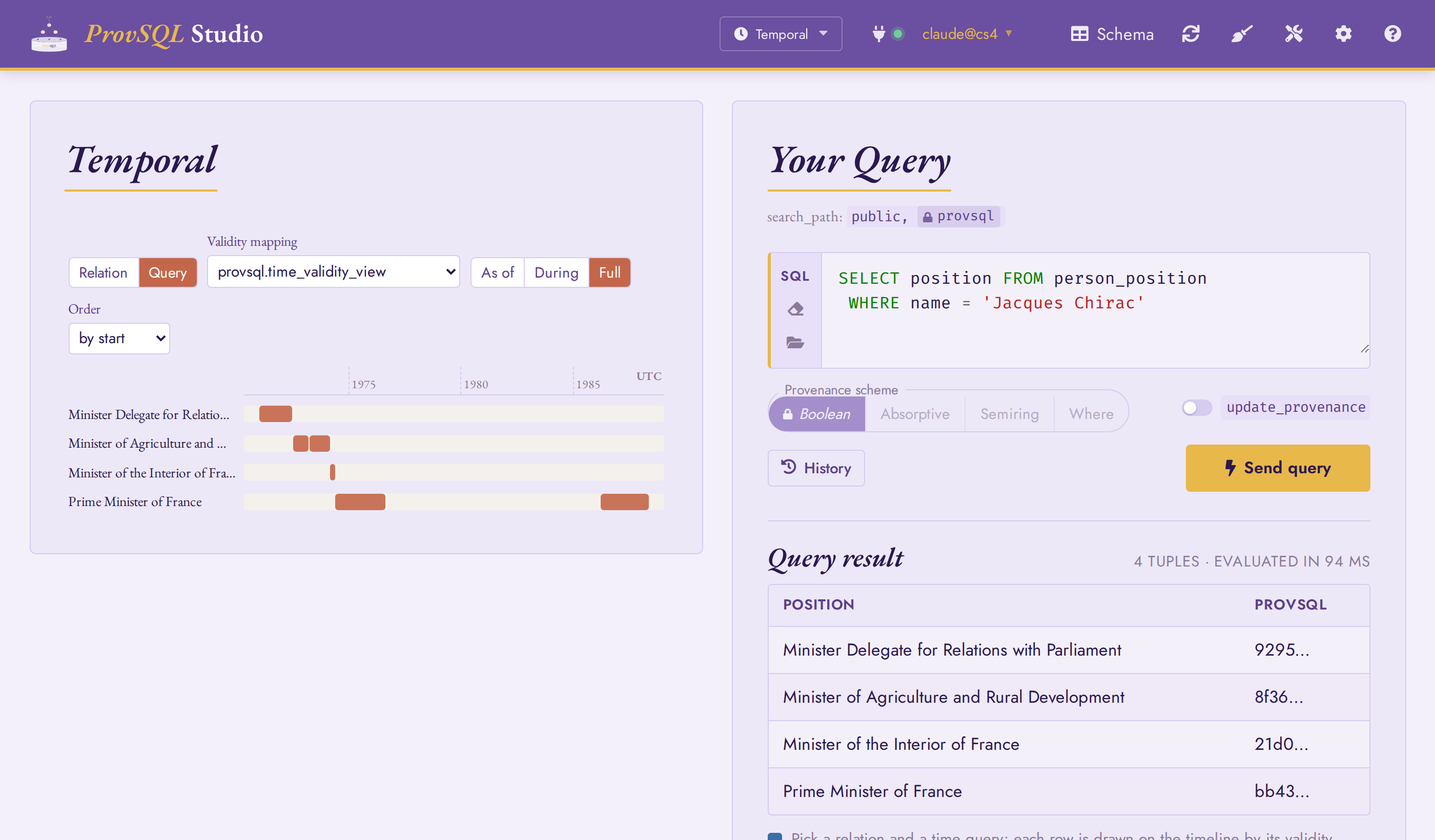
Chirac’s career, the lanes ordered by start; the Prime Minister lane carries two disjoint bars – his 1974-1976 term and the 1986-1988 cohabitation.
Each position becomes a lane, drawn over the full span of time it was
held; setting the Order control to by start lists
them in the order he took them up – Minister Delegate, Agriculture, the
Interior, then Prime Minister. A post held in separate spells, such as
Prime Minister in 1974-1976 and again during the 1986-1988 cohabitation,
shows as disjoint bars: the timeline draws the union of validity
intervals that sr_temporal computes from each row’s
provenance. The equivalent SQL, which Temporal mode runs for you, is:
SELECT position,
       sr_temporal(provenance(), 'time_validity_view') AS valid
FROM person JOIN holds ON person.id = holds.id
WHERE name = 'Jacques Chirac'
GROUP BY position
ORDER BY valid;
A snapshot in time (As of)
So far we typed SQL into the Query source; the Relation source is
quicker when you just want a tracked table or view on the timeline. Pick
person_position from the Relation selector, switch the
operation to As of, and set the instant to 1981-07-01:
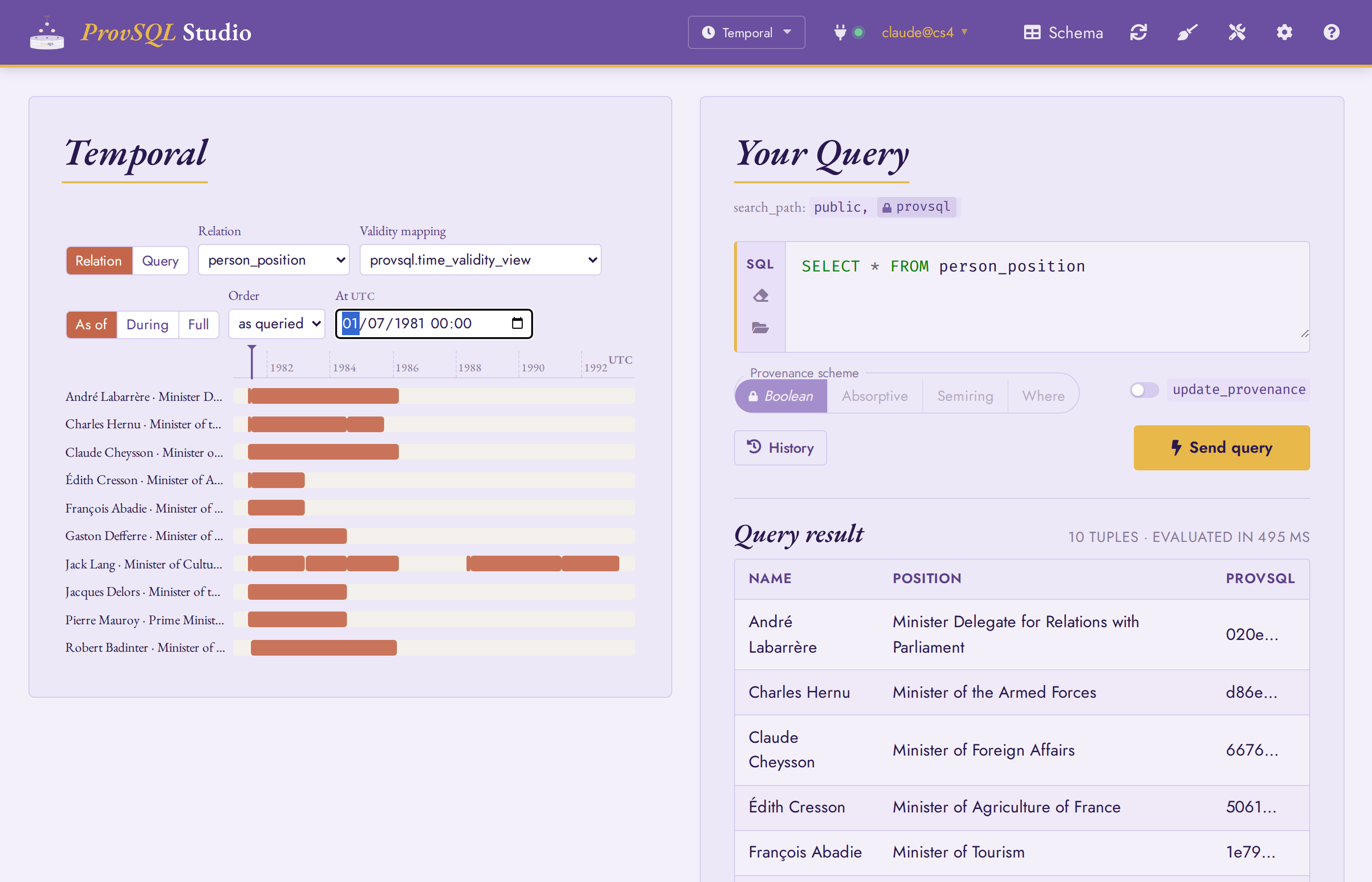
The government in place just after the Socialist victory of June 1981: Pierre Mauroy as Prime Minister, Robert Badinter at Justice. Drag the playhead to travel through time.
Only the rows valid at the playhead stay on the timeline – the Mauroy
cabinet installed after the Socialist victory, among them Mauroy (Prime
Minister), Badinter (Justice),
Jacques Delors (Economy)
and Jack Lang
(Culture). Drag the playhead (or click the axis) to scrub through
time and watch the government change. The SQL equivalent is
timetravel:
SELECT name, position FROM
  timetravel('person_position', '1981-07-01')
  AS tt(name TEXT, position TEXT, validity tstzmultirange, provsql uuid)
ORDER BY position;
Note
Under As of and During, the query runs once and
the result table on the right lists exactly the rows drawn on the
timeline – the table and the lanes always agree, each row carrying its
full validity in the valid_time column.
A window of time (During)
Switch to During and set the window to Macron’s first term,
2017-05-16 to 2022-05-13, over the Prime Ministers:
SELECT name, position FROM person_position
WHERE position = 'Prime Minister of France';
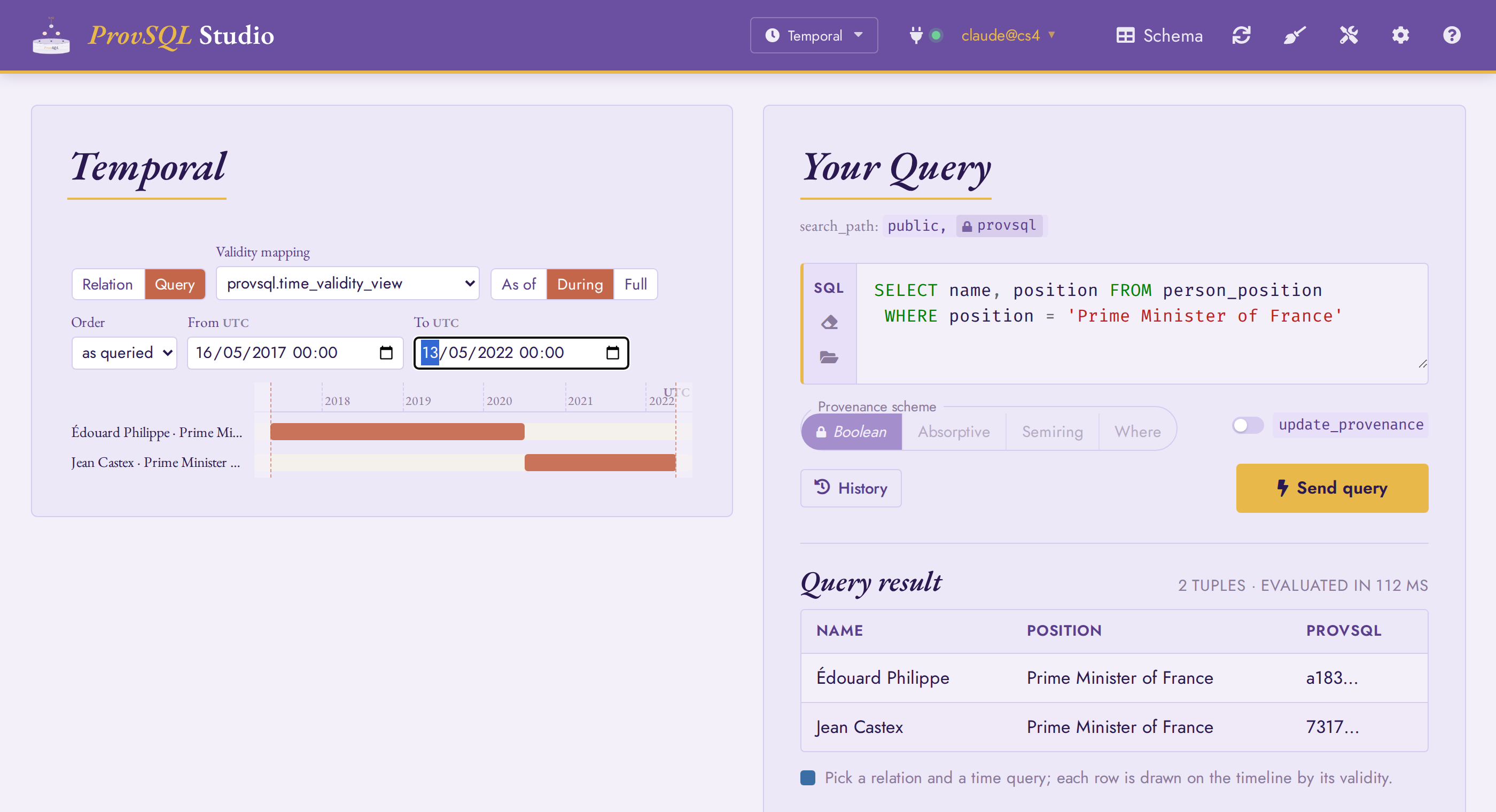
The two Prime Ministers who served during Macron’s first term: Édouard Philippe, then Jean Castex.
Every row whose validity meets the window appears, with the in-window
portion of each bar at full strength and the rest dimmed. The bars are
not clipped to the window – you still see each full term – matching
the semantics of timeslice:
SELECT name, validity FROM
  timeslice('person_position', '2017-05-16', '2022-05-13')
  AS (name TEXT, position TEXT, validity tstzmultirange, provsql uuid)
WHERE position = 'Prime Minister of France'
ORDER BY validity;
The full history of a role (Full)
Keep the Query source on Full and list every holder of a role to read its succession as a stack of lanes:
SELECT name FROM person_position
WHERE position = 'Minister of Justice';
Set the Order control to by start to read the holders in chronological order – the natural way to follow a role through time – without adding any sort to the query.
This is the timeline form of history, which returns all
versions of rows matching a set of column filters:
SELECT name, validity FROM
  history('person_position', ARRAY['position'], ARRAY['Minister of Justice'])
  AS (name TEXT, position TEXT, validity tstzmultirange, provsql uuid)
ORDER BY validity;
Beyond the timeline: editing history
Temporal mode is read-only. To change the data – and have ProvSQL
track the change – drop to SQL. These steps require
provsql.update_provenance:
SET provsql.update_provenance = on;
In Studio you can instead flip the update_provenance toggle beside the query box, which sets the same GUC for the session.
Replace the Prime Minister. ProvSQL intercepts every DML statement
and records it in update_provenance. Note who currently holds the
position in a plain table – a regular table, not TEMP, so it survives
the later steps (Studio runs each step in its own session) – then dismiss
them and appoint a placeholder:
CREATE TABLE fired_pm AS
  SELECT person.id, name FROM person
  JOIN holds ON person.id = holds.id
  WHERE position = 'Prime Minister of France'
    AND holds.validity @> now()::timestamptz;

DELETE FROM holds
WHERE position = 'Prime Minister of France'
  AND holds.validity @> now()::timestamptz;

INSERT INTO person (id, name, gender)
  VALUES (100000, 'Jeanne Dupont', 'female');
INSERT INTO holds (id, position, country)
  VALUES (100000, 'Prime Minister of France', 'FR');
Put the Prime Ministers back on the timeline (the Query source):
SELECT name FROM person_position WHERE position = 'Prime Minister of France';
With As of set to the present, Jeanne Dupont is the sole holder. To watch the dismissal land on the timeline, switch to During over a recent window – say 2010 to the present – so only the latest holders are in view: the just-dismissed minister’s lane, which ran open-ended off the right edge before, now closes at the deletion instant. This is the maintained validity mapping at work: the dismissed row keeps its original start, bounded at the deletion (see Adding Provenance to a Table).
Undo. The update_provenance table records every DML query with
its provenance token; undo reverses any recorded operation:
SELECT undo(provenance()) FROM update_provenance;
Running the same Prime-Minister query again confirms the original holder is back, their Prime Minister interval open-ended once more.